
PROFESSIONAL-CLOUD-DEVOPS-ENGINEER · Question #74
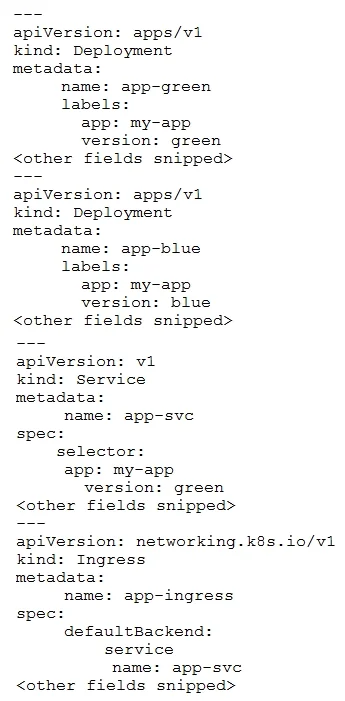
You manage an application that runs in Google Kubernetes Engine (GKE) and uses the blue/green deployment methodology. Extracts of the Kubernetes manifests are shown below: The Deployment app-green…
The correct answer is D. Change the selector on the Service app-svc to app: my-app, version: blue. In a blue/green setup, the Kubernetes Service routes traffic using label selectors. When app-green (new version) is causing failures, the fastest mitigation is to update the Service selector back to app: my-app, version: blue, redirecting all traffic to the stable blue…
Question
Exhibit
Options
- AUpdate the Deployment app-blue to use the new version of the application.
- BUpdate the Deployment app-green to use the previous version of the application.
- CChange the selector on the Service app-svc to app: my-app.
- DChange the selector on the Service app-svc to app: my-app, version: blue.
How the community answered
(41 responses)- A2% (1)
- B7% (3)
- C5% (2)
- D85% (35)
Explanation
In a blue/green setup, the Kubernetes Service routes traffic using label selectors. When app-green (new version) is causing failures, the fastest mitigation is to update the Service selector back to app: my-app, version: blue, redirecting all traffic to the stable blue Deployment. This is the rollback action in blue/green - the blue Deployment is still running and healthy. Option B (reverting the green Deployment) takes longer and is riskier. Options A and C do not correctly restore traffic to the known-good blue version.
Topics
Community Discussion
No community discussion yet for this question.