
PL-300 · Question #81
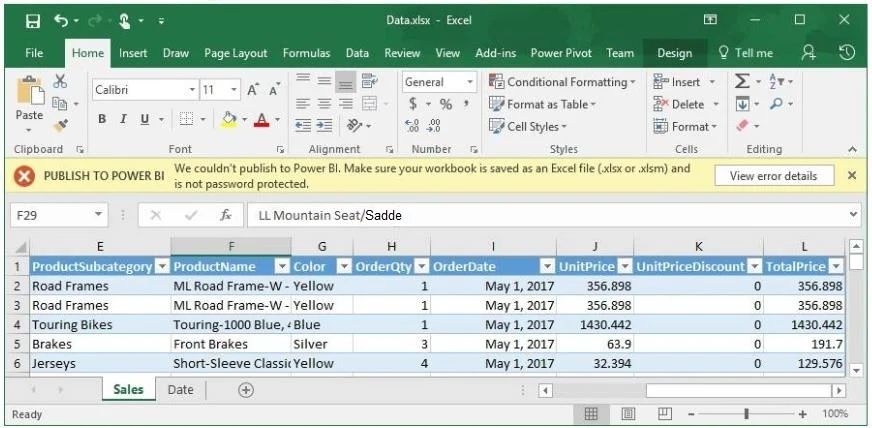
You attempt to publish a Microsoft Excel file to Power BI, and you receive the error message shown in the exhibit. (Click the Exhibit button.) The file is in c:\data\. You need to ensure that you…
The correct answer is B. Decrypt the workbook. The error shown in the exhibit indicates that the Excel workbook is password-protected or encrypted. Power BI cannot read or publish files that are encrypted or have workbook-level password protection. You must first remove the encryption (decrypt the workbook) before Power BI…
Question
You attempt to publish a Microsoft Excel file to Power BI, and you receive the error message shown in the exhibit. (Click the Exhibit button.) The file is in c:\data. You need to ensure that you can publish the file to Power BI. What should you do first?
Exhibit
Options
- ASave the file in a Microsoft SharePoint document library.
- BDecrypt the workbook.
- CAdd a digital signature to the workbook.
- DSet the file attributes to read-only.
How the community answered
(45 responses)- A16% (7)
- B73% (33)
- C2% (1)
- D9% (4)
Explanation
The error shown in the exhibit indicates that the Excel workbook is password-protected or encrypted. Power BI cannot read or publish files that are encrypted or have workbook-level password protection. You must first remove the encryption (decrypt the workbook) before Power BI can access and publish its contents. Saving to SharePoint, adding a digital signature, or setting it to read-only would not resolve an encryption-related publishing error.
Topics
Community Discussion
No community discussion yet for this question.