
PL-300 · Question #80
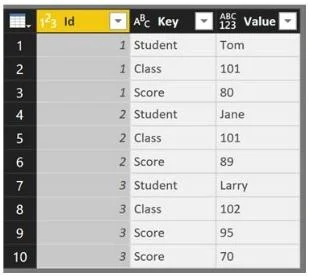
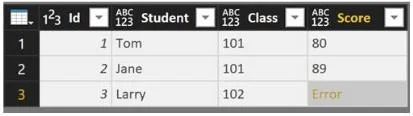
You have a table in Power BI Desktop as shown in the following exhibit. You pivot the columns as shown in the following exhibit. You need to resolve the error in row 3. The solution must preserve…
The correct answer is C. Change the Aggregate Value Function of the pivot. To resolve an error in a pivoted table while preserving all data, modify the pivot's aggregate value function to correctly handle the underlying data.
Question
You have a table in Power BI Desktop as shown in the following exhibit. You pivot the columns as shown in the following exhibit. You need to resolve the error in row 3. The solution must preserve all the data. What should you do?
Exhibits
Options
- AChange the Data Type of the Value column.
- BSelect the Key column, and then click Remove Duplicates.
- CChange the Aggregate Value Function of the pivot.
- DSelect the Score column, and then click Remove Errors.
How the community answered
(58 responses)- A17% (10)
- B7% (4)
- C72% (42)
- D3% (2)
Why each option
To resolve an error in a pivoted table while preserving all data, modify the pivot's aggregate value function to correctly handle the underlying data.
Changing the Data Type of the Value column after an error has occurred due to aggregation will not fix the underlying issue of how multiple values are combined during the pivot operation.
Removing duplicates from the Key column would eliminate rows from the original data, which violates the 'preserve all data' requirement and does not directly address the pivot aggregation error.
Errors in pivoted columns, especially in the 'Value' column, often occur when the default aggregation function (e.g., 'Sum') cannot handle multiple values in a cell or encounters non-numeric data. Changing the aggregate value function to something like 'Don't Aggregate', 'Count All', or 'First Value' can resolve the error by defining how multiple values are handled for each pivoted cell, thus preserving the underlying data.
Selecting the Score column and clicking 'Remove Errors' would remove rows containing errors, again violating the 'preserve all data' requirement by deleting data.
Concept tested: Power Query pivot table aggregation errors
Source: https://learn.microsoft.com/en-us/power-query/pivot-columns#options-for-the-pivot-column-dialog-box
Topics
Community Discussion
No community discussion yet for this question.