
PL-300 · Question #310
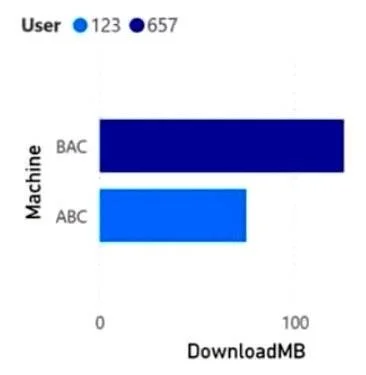
You are building a data model for a Power BI report. You have data formatted as shown in the following table. You need to create a clustered bar chart as shown in the following exhibit. What should…
The correct answer is A. From Power Query Editor, split the Machine-User column by using a delimiter. Splitting the Machine-User column by delimiter in Power Query Editor is the correct approach because it separates the combined column into two distinct columns (Machine and User) at the data transformation layer - making both fields independently available for use as chart axes…
Question
You are building a data model for a Power BI report. You have data formatted as shown in the following table. You need to create a clustered bar chart as shown in the following exhibit. What should you do?
Exhibit
Options
- AFrom Power Query Editor, split the Machine-User column by using a delimiter.
- BFrom Power Query Editor, create a column that contains the last three digits of the Machine-User
- CIn a DAX function, create two calculated columns named Machine and User by using the
- DIn a DAX function, create two measures named Machine and User by using the SUBSTITUTE
How the community answered
(27 responses)- A70% (19)
- B7% (2)
- C19% (5)
- D4% (1)
Explanation
Splitting the Machine-User column by delimiter in Power Query Editor is the correct approach because it separates the combined column into two distinct columns (Machine and User) at the data transformation layer - making both fields independently available for use as chart axes and legends in a clustered bar chart.
Why the distractors are wrong:
- B extracts only the last three characters, which captures only part of the data (e.g., the User portion) and discards the Machine value entirely - you'd lose one of the two needed fields.
- C DAX calculated columns can split text, but Power Query is the preferred and more efficient place to shape/transform raw data before it loads into the model; also, DAX functions like
LEFT/RIGHTwould work but this isn't described as a DAX approach here. - D Measures aggregate data for calculations - they cannot create new columns or categorical fields usable as chart dimensions;
SUBSTITUTEin a measure wouldn't produce the separate rows/columns needed for chart grouping.
Memory tip: Think of Power Query as your "data prep kitchen" - you split, clean, and reshape ingredients (columns) before cooking (building visuals). If a column has a consistent separator like a dash or comma, "split by delimiter" is almost always the right tool. When you see a combined column that needs to become two chart axes, reach for Power Query first.
Topics
Community Discussion
No community discussion yet for this question.