
PL-300 · Question #82
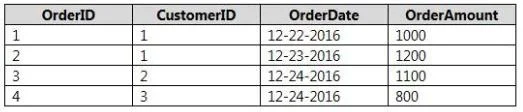
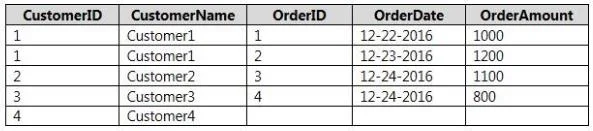
You have two tables named Customer and Orders. A sample of the Data in Customer is shown in the following table. A sample of the data in Orders is shown in the following table. You need to create…
The correct answer is D. Left Outer. To create a new table including all customers from the first table and their matching orders from the second table, use a Left Outer join.
Question
You have two tables named Customer and Orders. A sample of the Data in Customer is shown in the following table. A sample of the data in Orders is shown in the following table. You need to create the following new table. You must use Customer as the first table. Which join kind should you use?
Exhibits
Options
- ARight Anti
- BRight Outer
- CLeft Anti
- DLeft Outer
- EInner
How the community answered
(24 responses)- B4% (1)
- D92% (22)
- E4% (1)
Why each option
To create a new table including all customers from the first table and their matching orders from the second table, use a Left Outer join.
A Right Anti join returns only rows from the right table that have no matching rows in the left table, which is the opposite of the requirement.
A Right Outer join returns all rows from the right table and matching rows from the left table, which would not include customers without orders if `Customer` is the left table.
A Left Anti join returns only rows from the left table that have no matching rows in the right table, which would only show customers who have no orders.
A Left Outer join returns all rows from the first (left) table, `Customer`, and the matching rows from the second (right) table, `Orders`. If there is no match in `Orders` for a customer, the columns from the `Orders` table will show `NULL` values. This perfectly matches the requirement to show all customers, whether they have orders or not, alongside their order details.
An Inner join returns only the rows where there is a match in both tables, thus excluding any customers who have no orders.
Concept tested: Power Query join types (Merge Queries)
Source: https://learn.microsoft.com/en-us/power-query/merge-queries-overview
Topics
Community Discussion
No community discussion yet for this question.