
PL-300 · Question #191
Note: This question is part of a series of questions that use the same scenario. For your convenience, the scenario is repeated in each question. Each question presents a different goal and answer…
The correct answer is C. In the Store table query, use the Table.TrasformColumnTypes function. To resolve potential data type inconsistencies in the Store table for establishing relationships or proper data use, the Table.TransformColumnTypes function in Power Query is the appropriate method.
Question
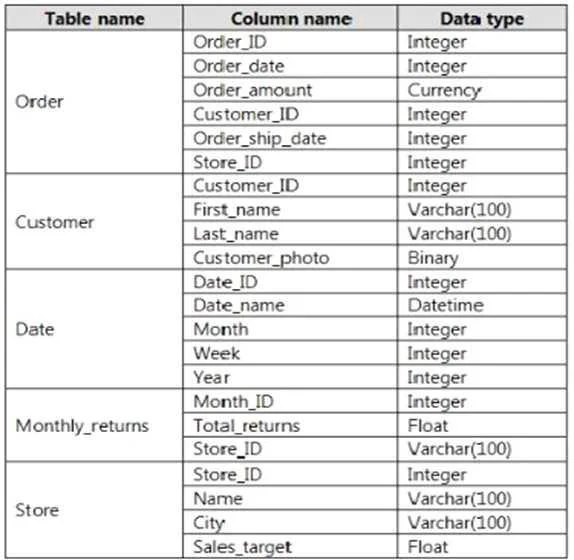
Note: This question is part of a series of questions that use the same scenario. For your convenience, the scenario is repeated in each question. Each question presents a different goal and answer choices, but the text of the scenario is the same in each question in this series. You have a Microsoft SQL Server database that contains the following tables. The following columns contain date information:
- Date[Month] in the mmyyyy format
- Date[Date_ID] in the ddmmyyyy format
- Date[Date_name] in the mm/dd/yyyy format
- Monthly_returns[Month_ID] in the mmyyyy format
The Order table contains more than one million rows. The Store table has a relationship to the Monthly_returns table on the Store_ID column. This is the only relationship between the tables. You plan to use Power BI Desktop to create an analytics solution for the data. You need to create a relationship between the Order table and the Store table on the Store_ID column. What should you do before you create the relationship?
Exhibit
Options
- AIn the Order table query, use the Table.TrasformRows function.
- BIn the Store table query, use the Table.TrasformRows function.
- CIn the Store table query, use the Table.TrasformColumnTypes function.
- DIn the Order table query, use the Table.TrasformColumnTypes function.
How the community answered
(30 responses)- A7% (2)
- B3% (1)
- C73% (22)
- D17% (5)
Why each option
To resolve potential data type inconsistencies in the Store table for establishing relationships or proper data use, the Table.TransformColumnTypes function in Power Query is the appropriate method.
The `Table.TransformRows` function applies a transformation to each row based on row-level logic, which is not the primary or most efficient method for simply changing column data types, and is applied to the wrong table.
The `Table.TransformRows` function applies a transformation to each row based on row-level logic, which is not the primary or most efficient method for simply changing column data types.
The `Table.TransformColumnTypes` function in Power Query Editor is specifically designed to change the data type of one or more columns within a table, which is crucial for ensuring data consistency and enabling relationships like the one between the Store and Monthly_returns tables.
While `Table.TransformColumnTypes` is correct for changing data types, this option applies the transformation to the `Order` table, not the `Store` table, making it incorrect if the data type issue resides within the `Store` table.
Concept tested: Power Query M data type transformation
Source: https://learn.microsoft.com/powerquery-m/table-transformcolumntypes
Topics
Community Discussion
No community discussion yet for this question.