
PL-300 · Question #190
Note: This question is part of a series of questions that use the same scenario. For your convenience, the scenario is repeated in each question. Each question presents a different goal and answer…
The correct answer is B. In the Monthly_returns table, create a new calculated column named DateJD that uses the. The goal is to enable a relationship between the Date table and the Monthly_returns table. The Date table has a Month column in mmyyyy format, and Monthly_returns has a Month_ID column also in mmyyyy format - these could theoretically be joined. However, the scenario requires…
Question
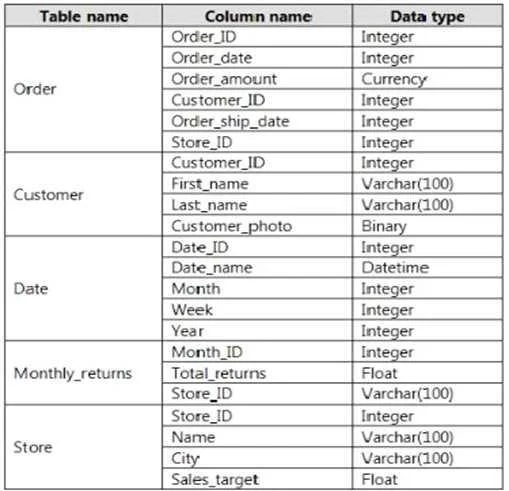
Note: This question is part of a series of questions that use the same scenario. For your convenience, the scenario is repeated in each question. Each question presents a different goal and answer choices, but the text of the scenario is the same in each question in this series. You have a Microsoft SQL Server database that contains the following tables. The following columns contain date information:
- Date[Month] in the mmyyyy format
- Date[Date_ID] in the ddmmyyyy format
- Date[Date_name] in the mm/dd/yyyy format
- Monthly_returns[Month_ID] in the mmyyyy format
The Order table contains more than one million rows. The Store table has a relationship to the Monthly_returns table on the Store_ID column. This is the only relationship between the tables. You plan to use Power BI Desktop to create an analytics solution for the data. You need to create a relationship between the Monthly_returns table and Date[Date_ID]. What should you do before you create the relationship?
Exhibit
Options
- AIn the Date table, create a new calculated column named MonthJD that uses the yyyydd format.
- BIn the Monthly_returns table, create a new calculated column named DateJD that uses the
- CTo the Order table, add a calculated column that uses the RELATED(Monthly_returns[Month_ID])
- DTo the Date table, add a calculated column that uses the RE LATE D(Monthly_ret urns
How the community answered
(20 responses)- A10% (2)
- B75% (15)
- C15% (3)
Explanation
The goal is to enable a relationship between the Date table and the Monthly_returns table. The Date table has a Month column in mmyyyy format, and Monthly_returns has a Month_ID column also in mmyyyy format - these could theoretically be joined. However, the scenario requires creating a proper date key. Creating a new calculated column (DateJD) in the Monthly_returns table allows you to derive a date value using RELATED or date functions that can match a key in the Date table, establishing the required relationship. Option A (adding a MonthJD column to the Date table in yyyydd format) would create a non-standard key that doesn't align with existing columns in Monthly_returns. Option C (adding a RELATED column to the Order table) is problematic because RELATED requires an existing relationship to traverse - you can't use it to create the relationship itself. Option D has the same issue as C, and uses RELATED to cross from Date to Monthly_returns before the relationship exists.
Topics
Community Discussion
No community discussion yet for this question.