
PL-300 · Question #176
Note: This question is a part of a series of questions that present the same scenario. For your convenience, the scenario is repeated in each question. Each question presents a different goal and…
The correct answer is B. Table.Distinct. Although the question is cut off, based on the options provided for table manipulation, 'Table.Distinct' is the standard M function to create a table containing only the unique rows from another table.
Question
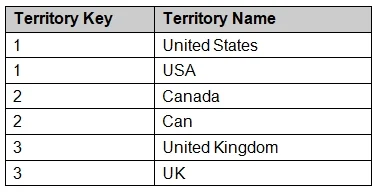
Note: This question is a part of a series of questions that present the same scenario. For your convenience, the scenario is repeated in each question. Each question presents a different goal and answer choices, but the text of the scenario is exactly the same in each question in this series. Start of repeated scenario You have a Microsoft SQL Server database that has the tables shown in the Database Diagram exhibit. You plan to develop a Power BI model as shown in the Power BI Model exhibit. You plan to use Power BI to import data from 2013 to 2015. Product Subcategory [Subcategory] contains NULL values. End of repeated scenario. You implement the Power BI model. You add another table named Territory to the model. A sample of the data is shown in the following table. You need to create a relationship between the Territory table and the Sales table. Which function should you use in the query for Territory before you create the relationship?
Exhibit
Options
- ATable.RemoveMatchingRows
- BTable.Distinct
- CTable.InDistinct
- DTable.ReplaceMatchingRows
How the community answered
(25 responses)- A4% (1)
- B72% (18)
- C16% (4)
- D8% (2)
Why each option
Although the question is cut off, based on the options provided for table manipulation, 'Table.Distinct' is the standard M function to create a table containing only the unique rows from another table.
Table.RemoveMatchingRows removes rows from a table that match a specific set of criteria, rather than just returning all distinct rows from the entire table.
The M function `Table.Distinct` is specifically designed to remove duplicate rows from a table, returning a new table that contains only the unique (distinct) rows, which is a common data preparation step for ensuring data uniqueness.
Concept tested: Power Query M function for distinct rows
Source: https://learn.microsoft.com/en-us/powerquery-m/table-distinct
Topics
Community Discussion
No community discussion yet for this question.