
PL-200 · Question #75
Drag and Drop Question A company has employees in France, Mexico, and the United States. You are creating a Power Apps app to allow users to add client records to Microsoft Dataverse. The default…
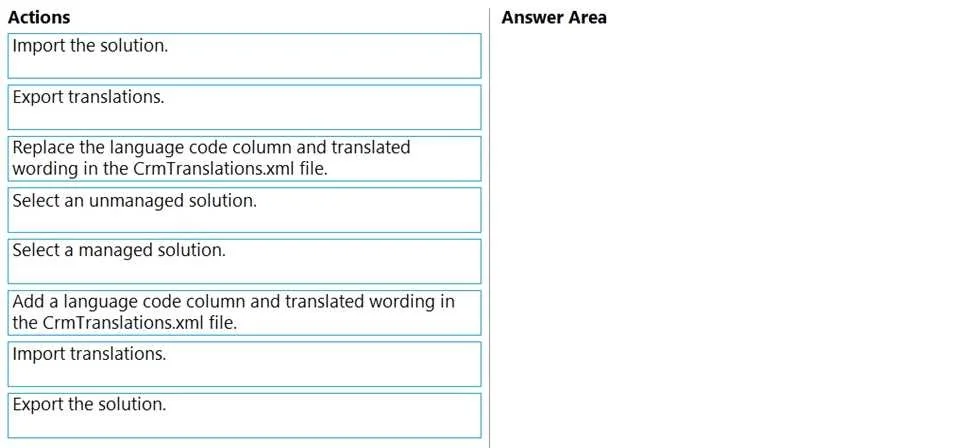
The correct answer is Select an unmanaged solution.; Export translations.; Add a language code column and translated wording in the CrmTranslations.xml file.; Import translations. The correct sequence for adding new language translations to a Power Apps solution involves selecting an unmanaged solution, exporting translations, modifying the translation file with new language content, and then importing the updated translations.
Question
Exhibit
Answer Area
Drag items
Correct arrangement
- Select an unmanaged solution.
- Export translations.
- Add a language code column and translated wording in the CrmTranslations.xml file.
- Import translations.
Explanation
The correct sequence for adding new language translations to a Power Apps solution involves selecting an unmanaged solution, exporting translations, modifying the translation file with new language content, and then importing the updated translations.
Approach. The correct interaction is to drag the following four actions into the 'Answer Area' in this precise order:
- Select an unmanaged solution. - Customizations, including adding new language translations, must be performed within an unmanaged solution. Managed solutions are designed for distribution and consumption, not direct modification in the target environment.
- Export translations. - This action generates a zipped XML file (CrmTranslations.xml) containing all customizable UI text for the components within the selected unmanaged solution. This file serves as the template for adding new language translations.
- Add a language code column and translated wording in the CrmTranslations.xml file. - After exporting, the CrmTranslations.xml file is extracted and opened (typically in Excel, as shown in Image 3). To introduce a new language, a new column representing that language's locale ID (e.g., 3082 for Spanish, 1036 for French) must be added. The corresponding translated strings for all relevant UI elements are then entered into this new column.
- Import translations. - Once the CrmTranslations.xml file has been updated with the new language column and its translations, it is saved, re-zipped if necessary, and imported back into the unmanaged solution. This action applies the new translations to the Power Apps components, making them available to users.
Common mistakes.
- common_mistake. Common mistakes include:
- Selecting a managed solution: Managed solutions are read-only for direct customization and cannot be used to add or modify translations directly in the target environment.
- Confusing 'Import the solution' or 'Export the solution' with 'Import translations' or 'Export translations': The former actions deal with the entire solution package, while the latter are specific to localization strings. The scenario specifically asks to add languages, pointing to translation-specific actions.
- 'Replace the language code column and translated wording in the CrmTranslations.xml file': While you replace wording in columns, when adding a new language, you add a new language code column, not replace an existing one. The phrasing 'Add a language code column and translated wording' is more accurate for the scenario of introducing new languages.
- Incorrect order of operations: Performing steps out of sequence, such as importing translations before exporting and modifying the XML file, or attempting to modify translations without first selecting the correct solution, would lead to failure or incorrect results. The provided sequence is the standard and logical workflow.
Concept tested. This question tests the candidate's understanding of localization and globalization in Microsoft Dataverse and Power Apps. It specifically assesses knowledge of the process for adding multi-language support to solutions, the role and manipulation of the CrmTranslations.xml file, and the fundamental distinction between managed and unmanaged solutions in the context of customization and deployment.
Topics
Community Discussion
No community discussion yet for this question.