nerdexam
Microsoft

PL-200 · Question #346

Drag and Drop Question You are configuring Dataverse for a company. The company has the following requirements for document management, which must be met by using native functionality: - A single…

The correct answer is Document column; Microsoft Azure Blob Storage; Microsoft SharePoint; Attachments. This question assesses the ability to match Dataverse document management requirements to appropriate native solutions like Document columns, Dataverse File data type (backed by Azure Blob Storage), SharePoint integration, and Attachments (Notes functionality).

Configure Microsoft Dataverse

Question

Drag and Drop Question You are configuring Dataverse for a company. The company has the following requirements for document management, which must be met by using native functionality: - A single file must be stored and accessed directly from an Account row. No additional metadata should be captured. - Multiple files must be stored and accessed from a Contact with support for version control. - Documents must be stored within an on-premises environment. - Additional rich-text notes must be stored alongside one or multiple file uploads. You need to recommend a solution for each requirement. Which solution should you recommend? To answer, move the appropriate solutions to the correct requirements. You may use each solution once, more than once, or not at all. You may need to move the split bar between panes or scroll to view content. NOTE: Each correct selection is worth one point. Answer:

Exhibit
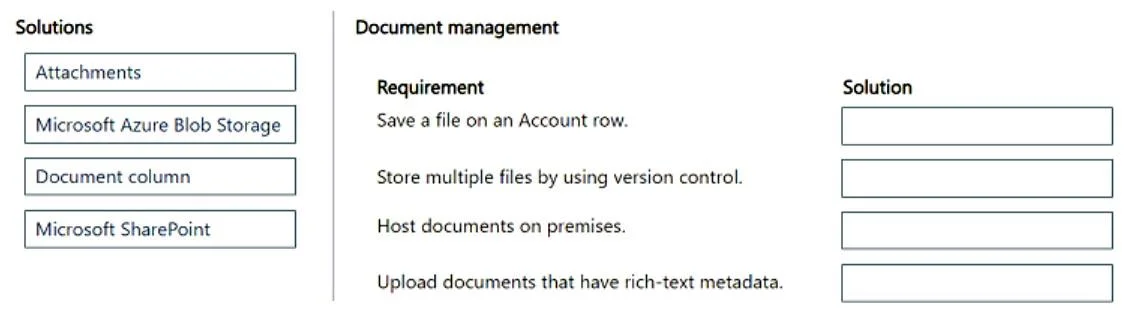
PL-200 question #346 exhibit

Answer Area

Drag items

AttachmentsMicrosoft Azure Blob StorageDocument columnMicrosoft SharePoint

Correct arrangement

  • Document column
  • Microsoft Azure Blob Storage
  • Microsoft SharePoint
  • Attachments

Explanation

This question assesses the ability to match Dataverse document management requirements to appropriate native solutions like Document columns, Dataverse File data type (backed by Azure Blob Storage), SharePoint integration, and Attachments (Notes functionality).

Approach. The correct approach involves understanding the native capabilities of Dataverse and its integrated services for different document management scenarios:

  1. Requirement: Save a file on an Account row.

    • Solution: Document column
    • Reasoning: A 'Document column' (more precisely, a 'File' data type column in Dataverse) is specifically designed to store a single file directly on a record (row) within Dataverse. This meets the need for a single file stored directly on an Account row without capturing additional metadata beyond the file itself.
  2. Requirement: Store multiple files by using version control.

    • Solution: Microsoft Azure Blob Storage
    • Reasoning: Dataverse's native 'File' data type stores its content in Azure Blob Storage and supports versioning for files. While a single 'File' column holds one file, 'multiple files' for a record can be achieved by having multiple 'File' columns or a related custom table with a 'File' column. This option represents Dataverse's native file storage capabilities, including version control, making it suitable when SharePoint is used for other distinct requirements.
  3. Requirement: Host documents on premises.

    • Solution: Microsoft SharePoint
    • Reasoning: Microsoft SharePoint (specifically SharePoint Server for on-premises deployments) is the primary integrated solution for Dataverse/Dynamics 365 to manage documents in an on-premises environment. This directly addresses the requirement for on-premises document storage.
  4. Requirement: Upload documents that have rich-text metadata.

    • Solution: Attachments
    • Reasoning: In Dataverse/Dynamics 365, 'Attachments' are part of the Notes (Annotation) functionality. This feature allows users to associate rich-text notes (the 'note text' field) with one or more attached files, directly fulfilling the requirement for rich-text metadata alongside file uploads.

Common mistakes.

  • common_mistake. A common mistake is incorrectly associating 'Microsoft Azure Blob Storage' only with custom, external integrations, failing to recognize its role as the underlying storage for Dataverse's native 'File' data type which offers versioning. Another mistake is to always assign 'Microsoft SharePoint' to 'Store multiple files by using version control' without considering that Dataverse's native file columns (backed by Blob Storage) also offer versioning and that SharePoint might be specifically required for on-premises hosting. Also, misinterpreting 'Attachments' as generic file storage instead of the rich-text Note entity would be incorrect, as it's the rich-text aspect of Notes that is being tested here. Using 'Document column' for multiple files, version control, or rich-text metadata is also a common error as it is designed for simple, single-file storage per column.

Concept tested. Dataverse document and file management capabilities, including the use of native 'File' data type (backed by Azure Blob Storage) for version control, the 'Notes/Attachments' entity for rich-text metadata with files, and integration with Microsoft SharePoint for comprehensive document management (including on-premises hosting).

Reference. null

Topics

#Dataverse document management#SharePoint integration#File column#Notes (Annotations)

Community Discussion

No community discussion yet for this question.

Full PL-200 Practice