
PL-200 · Question #259
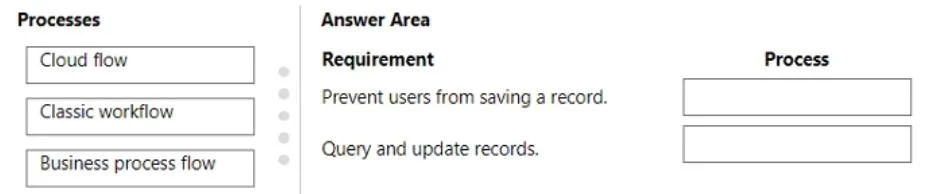
Drag and Drop Question A company has a model-driven app. The app must meet the following requirements: - Prevent users from saving a record if validation from a custom action fails. - Query and…
The correct answer is Business process flow; Cloud flow. This question tests knowledge of Power Platform process types available in model-driven apps and which tool is appropriate for record-save validation versus bulk data operations - both without writing code.
Question
Exhibit
Answer Area
Drag items
Correct arrangement
- Business process flow
- Cloud flow
Explanation
This question tests knowledge of Power Platform process types available in model-driven apps and which tool is appropriate for record-save validation versus bulk data operations - both without writing code.
Approach. Business process flow (BPF) is the correct choice for requirement 1 because BPFs can include action steps that invoke custom actions synchronously within the model-driven app UI; if the custom action returns a failure, the BPF blocks stage progression and prevents the record from being saved - all without code. Cloud flow is correct for requirement 2 because Power Automate Cloud flows natively support Dataverse connectors with List Rows and Update Row actions, making them purpose-built for querying and updating collections of records in bulk. Classic workflow is a distractor here: while real-time (synchronous) classic workflows can block saves, they cannot directly call modern custom actions in the same no-code way, and they are being deprecated in favor of the other two options.
Concept tested. Microsoft Power Platform process selection: matching Business Process Flow (BPF with action steps for validation-gated saves) and Cloud Flow (Dataverse bulk record operations) to the correct no-code requirements in a model-driven app context.
Reference. Microsoft Learn - 'Business process flows overview' and 'Use Dataverse connector in Power Automate' (learn.microsoft.com/power-automate)
Topics
Community Discussion
No community discussion yet for this question.