
PL-200 · Question #242
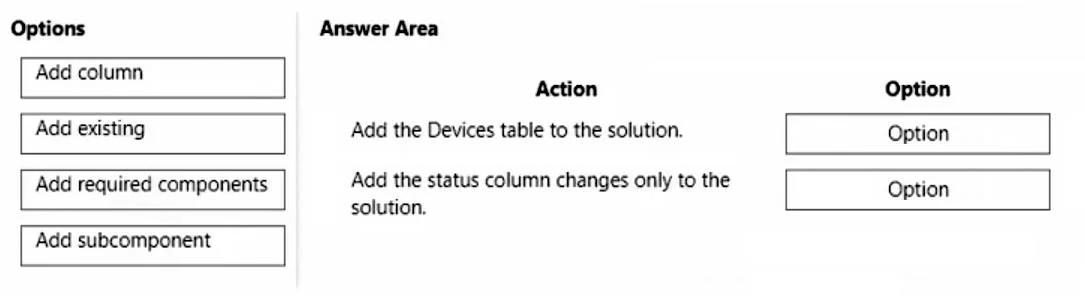
Drag and Drop Question A company that manufactures medical devices uses Power Apps to manage their sales and device maintenance. A Table named Devices in Microsoft Dataverse has a column named…
The correct answer is Add the Devices table to the solution. - Add existing; Add the status column changes only to the solution. - Add existing. The question tests the ability to correctly add existing Dataverse table components and subcomponents to a Power Apps solution for deployment.
Question
Exhibit
Answer Area
Drag items
Correct arrangement
- Add the Devices table to the solution. - Add existing
- Add the status column changes only to the solution. - Add existing
Explanation
The question tests the ability to correctly add existing Dataverse table components and subcomponents to a Power Apps solution for deployment.
Approach. For the first action, 'Add the Devices table to the solution.', the correct option is 'Add existing'. This is the standard command in Power Apps solutions to bring an existing component (like a Dataverse table) from the current environment into the solution. For the second action, 'Add the status column changes only to the solution.', the correct option is also 'Add existing'. While this action targets a specific subcomponent (a column and its changes), the process in Power Apps solutions begins with 'Add existing'. When adding an existing table, the user is presented with the option to 'Select components', which allows them to choose specific forms, views, columns, or other subcomponents, rather than including the entire table definition. This method ensures that only the desired column changes are included in the solution for promotion, aligning with the requirement 'Only this change must be promoted to the test environment'.
Common mistakes.
- common_mistake. Using 'Add column' would be incorrect because it's used to create a new column within a table, not to add an existing table or an existing column's definition to a solution. 'Add required components' is typically an option that appears when adding a component that has dependencies, not a primary action for adding the component itself or a specific change. 'Add subcomponent' as a standalone drag option is misleading; while the second action involves adding a subcomponent, the initiating action in the Power Apps solution interface to add an existing subcomponent of a table is 'Add existing', followed by selecting specific components within the dialogue. Dragging 'Add subcomponent' directly implies a top-level menu item, which is not how existing table subcomponents are typically added to a solution.
Concept tested. Power Apps solution management, adding existing Dataverse components (tables) and specific subcomponents (columns with choice definitions) to a solution, and understanding the 'Add existing' component workflow for granular deployments.
Topics
Community Discussion
No community discussion yet for this question.