
PL-200 · Question #241
Drag and Drop Question A company is updating a Power Apps solution that contains two tables named Services and Equipment. The company is creating a new solution to update the current solution for…
The correct answer is Include entity metadata; Select components. To update a table's metadata like change tracking, 'Include entity metadata' is used, while 'Select components' is chosen to add specific new columns, adhering to the requirement of updating only changed components.
Question
Exhibit
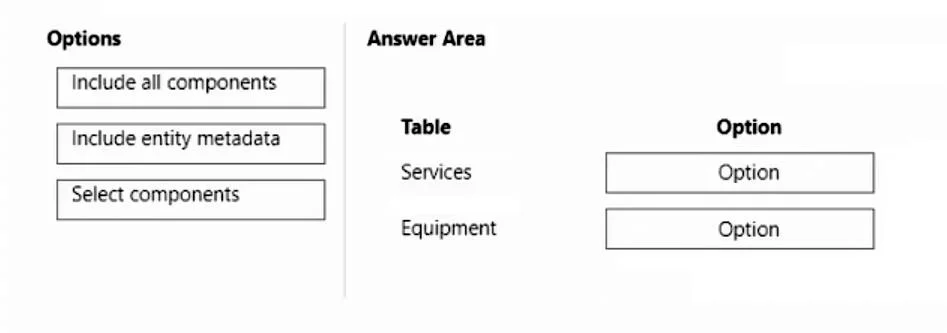
Answer Area
Drag items
Correct arrangement
- Include entity metadata
- Select components
Explanation
To update a table's metadata like change tracking, 'Include entity metadata' is used, while 'Select components' is chosen to add specific new columns, adhering to the requirement of updating only changed components.
Approach. The question requires creating a new solution to update an existing Power Apps solution. For the 'Services' table, the requirement is to 'include change tracking'. Change tracking is a property of the table (entity) itself, a metadata setting. Therefore, 'Include entity metadata' is the correct option to select for the 'Services' table, as it specifically targets changes to the entity's properties. For the 'Equipment' table, the requirement is to 'include four new columns'. Columns are specific components within a table. The overall requirement states that 'the solution must update only the components that need to be added or changed'. 'Select components' allows the user to precisely choose which specific components (in this case, the four new columns) of the 'Equipment' table to include, satisfying the requirement for selective updates. Therefore, 'Select components' is the correct option for the 'Equipment' table.
Common mistakes.
- common_mistake. A common mistake would be to use 'Include all components' for either table. While it might technically include the necessary changes, it would also include all other existing components of that table, which goes against the explicit requirement to 'update only the components that need to be added or changed'. Using 'Select components' for the 'Services' table when updating change tracking (a metadata property) would be incorrect, as 'Include entity metadata' is specifically designed for such changes. Conversely, using 'Include entity metadata' for the 'Equipment' table to add new columns would be wrong, as new columns are structural components, not metadata properties of the entity itself in this context; 'Select components' is required to pick specific structural elements.
Concept tested. The core concept being tested is Power Apps solution management, specifically understanding the different options available when adding existing tables (entities) to a solution for update purposes. This includes distinguishing between updating table metadata (like enabling change tracking) versus updating specific components within a table (like adding new columns), and applying best practices for incremental solution updates by including only necessary components.
Topics
Community Discussion
No community discussion yet for this question.