
Microsoft
PL-200 · Question #190
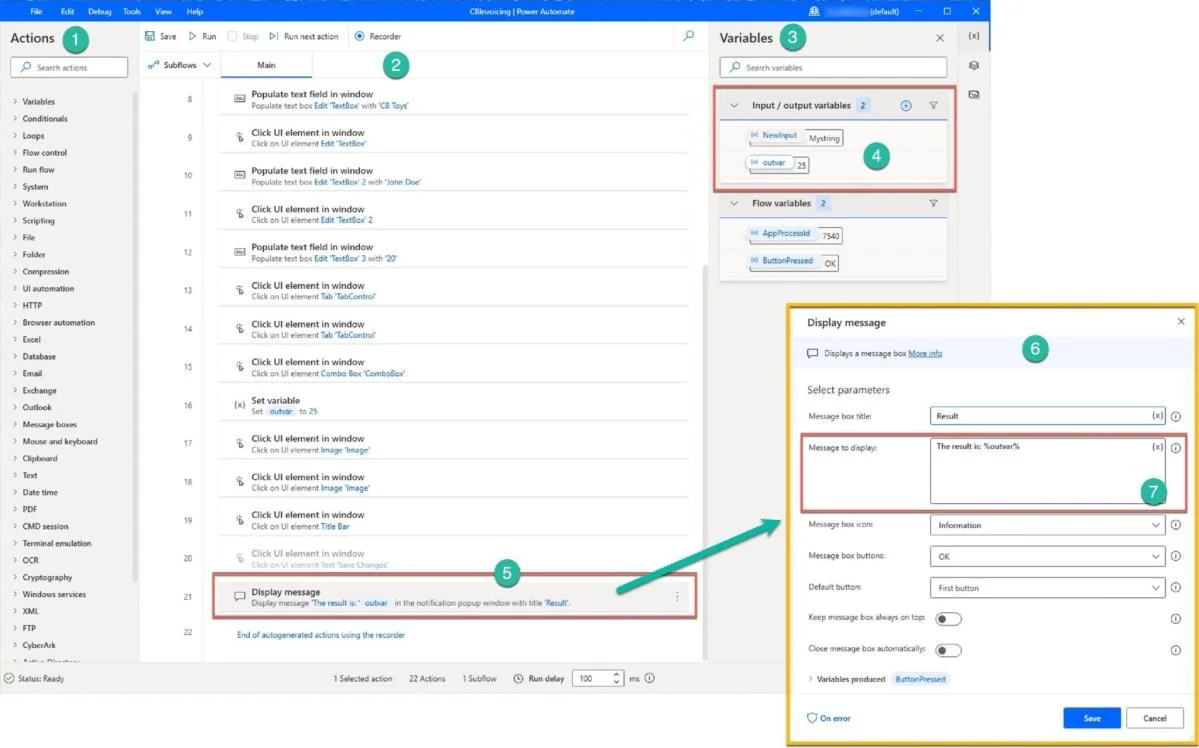
Your desktop flow stores the run output in the outvar variable. You need to present a message with the run result using the Display message action.
Sign in or unlock PL-200 to reveal the answer and full explanation for question #190. The question stem and answer options stay visible for context.
Create and manage logic and process automation
Question
Your desktop flow stores the run output in the outvar variable. You need to present a message with the run result using the Display message action.
Exhibit
Options
- A'The result is: #outvar#'
- B'The result is: ' + outvar
- C%'The result is: outvar'%
- DThe result is: %outvar%
- E#'The result is: $outvar'#
- F%'The result is: $outvar'%
Unlock PL-200 to see the answer
You've previewed enough free PL-200 questions. Unlock PL-200 for full answers, explanations, the timed quiz mode, progress tracking, and the master PDF. Question stem and options stay visible so you can still see what's on the exam.
Topics
#Power Automate Desktop#Variables#Display message action#Desktop flows