
PL-200 · Question #178
You want to have more robust handling of the escalation in your PVA. What should you do?
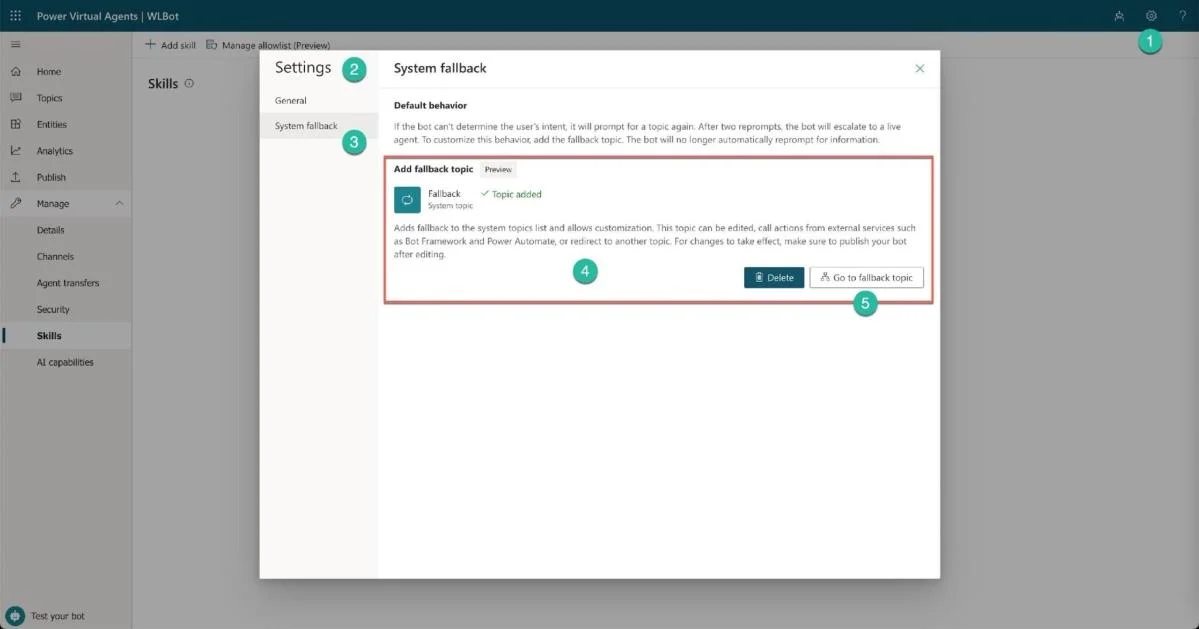
The correct answer is D. In System fallback settings, add Fallback Topic item. In Power Virtual Agents, the System Fallback topic is a special built-in topic that triggers when the bot cannot match the user's input to any existing topic. To implement more robust escalation handling - such as routing to a live agent or providing a custom fallback…
Question
Exhibit
Options
- AAsk an admin to enable Fallback functionality
- BIn General settings, enable Fallback Topic item
- CIn Manage Details, add the Fallback Topic to the bot
- DIn System fallback settings, add Fallback Topic item
How the community answered
(32 responses)- B6% (2)
- C3% (1)
- D91% (29)
Explanation
In Power Virtual Agents, the System Fallback topic is a special built-in topic that triggers when the bot cannot match the user's input to any existing topic. To implement more robust escalation handling - such as routing to a live agent or providing a custom fallback experience - you configure this behavior within the System Fallback settings by adding or customizing the Fallback Topic. This is done through the PVA interface under 'System fallback' settings, not through General settings, Manage Details, or by involving an admin. Enabling a 'Fallback functionality' flag (A) or toggling a General settings item (B) are not valid PVA configuration paths for this feature.
Topics
Community Discussion
No community discussion yet for this question.