
PL-200 · Question #127
Drag and Drop Question You create a new solution for a business process. The business process includes uploading specific file types to a web service. You need to ensure that the business process…
The correct answer is Solution system settings; Environment variable. This question assesses the ability to correctly apply Power Platform configuration options for deploying solutions consistently across different environments.
Question
Exhibit
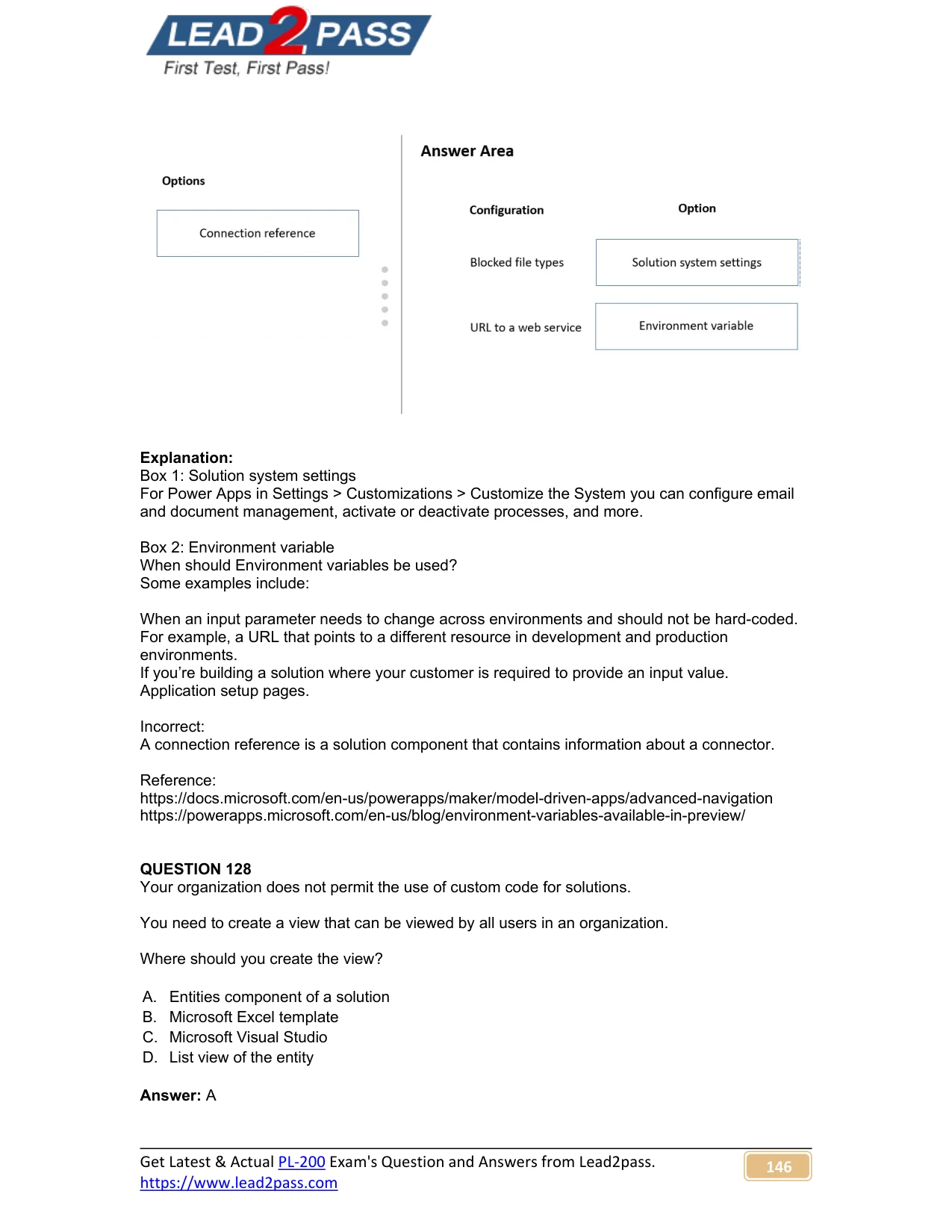
Answer Area
Drag items
Correct arrangement
- Solution system settings
- Environment variable
Explanation
This question assesses the ability to correctly apply Power Platform configuration options for deploying solutions consistently across different environments.
Approach. To ensure the business process works the same way anywhere the solution is deployed, but with environment-specific configurations:-
-
For 'Blocked file types': Drag 'Solution system settings' to this configuration. System-level settings in Power Platform (such as those related to file types allowed for attachments or document management) are managed through the 'Solution system settings'. These settings govern core system behavior and are configured at the environment level, providing a consistent policy across the deployed solution.
-
For 'URL to a web service': Drag 'Environment variable' to this configuration. Environment variables are designed to store configuration values or parameters (like URLs, connection strings, or API keys) that need to change between different deployment environments (e.g., development, test, production). Using an environment variable for a web service URL allows the solution to reference a different endpoint in each environment without requiring modification of the solution code itself, thus ensuring consistency while adapting to environmental specifics.
Common mistakes.
- common_mistake. A common mistake would be to drag 'Connection reference' to 'URL to a web service'. While connection references are crucial for cross-environment deployments, they specifically manage the connection information for connectors (e.g., Dataverse, SQL Server, SharePoint, custom connectors). A 'URL to a web service' is a more general parameter that might not necessarily involve a Power Platform connector. Environment variables are better suited for generic URLs or other configuration parameters that vary per environment but aren't tied to a specific connector's authentication or data source details.
Concept tested. The core concept tested is the ability to effectively manage solution configurations and parameters for multi-environment deployment in Microsoft Power Platform (Power Apps/Dynamics 365). This includes understanding the appropriate use cases for Environment variables (for dynamic configuration values), Solution system settings (for global environment behaviors), and Connection references (for abstracting connector connections).
Topics
Community Discussion
No community discussion yet for this question.