
PL-200 · Question #119
Hotspot Question A company plans to use Power Automate to increase employee efficiency. You need to recommend the types of flows that the company should use. Which flow type should you recommend? To…
The correct answer is Desktop flow; Scheduled flow. This question tests the ability to correctly identify and match Power Automate flow types to specific business automation scenarios based on their triggers and capabilities.
Question
Exhibit
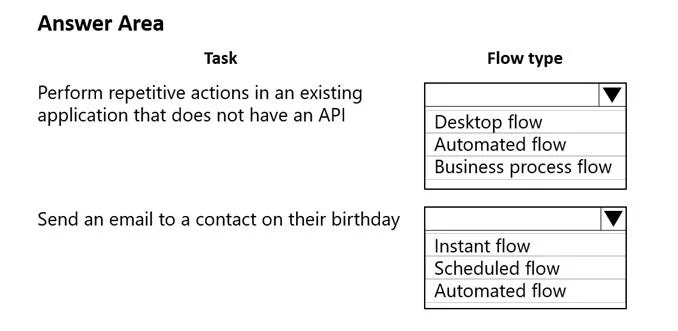
Answer Area
Drag items
Correct arrangement
- Desktop flow
- Scheduled flow
Explanation
This question tests the ability to correctly identify and match Power Automate flow types to specific business automation scenarios based on their triggers and capabilities.
Approach. For the task 'Perform repetitive actions in an existing application that does not have an API', the correct choice is 'Desktop flow'. Desktop flows are designed for Robotic Process Automation (RPA), which automates tasks on desktop applications, particularly useful for legacy systems or applications that lack direct API integration. They mimic human interactions, making them ideal for repetitive actions in such scenarios. For the task 'Send an email to a contact on their birthday', the correct choice is 'Scheduled flow'. Scheduled flows are designed to run at specific intervals (e.g., daily, weekly, monthly) or on a particular date and time. Sending an email 'on their birthday' implies a recurring, time-based trigger that checks for birthdays daily and sends the email on the appropriate day, which is perfectly suited for a scheduled flow.
Common mistakes.
- common_mistake. For the first task, choosing 'Automated flow' would be incorrect because automated flows are triggered by events and primarily rely on connectors or APIs for integration. They cannot directly interact with applications that do not expose an API. 'Business process flow' is incorrect as it is designed for guiding users through a structured business process, not for automating repetitive tasks on a non-API application. For the second task, choosing 'Instant flow' would be incorrect because instant flows are manually triggered by a user, not automatically on a schedule. 'Automated flow' would also be incorrect because while it triggers on events, a birthday is a date-based recurring schedule, not a specific event that just occurred to trigger the flow in the conventional sense (like an email arriving or a file being created). The most natural fit for a date-driven recurring task is a scheduled flow.
Concept tested. The core concept tested is the understanding of different Power Automate flow types (Desktop, Automated, Instant, Scheduled, Business Process) and their appropriate use cases, particularly distinguishing between event-driven, time-driven, and RPA-driven automation scenarios.
Reference. null
Topics
Community Discussion
No community discussion yet for this question.