
PL-200 · Question #113
Drag and Drop Question You are implementing a model-driven app to support a new line of business. There are several places where automated business logic must be applied. You need to determine how…
The correct answer is Business rule; Real-time workflow; Real-time workflow. This question assesses the test-taker's ability to choose the appropriate Power Platform automation tool (Business rule, Real-time workflow, Power Automate instant flow) for specific business logic requirements within a model-driven app.
Question
Exhibit
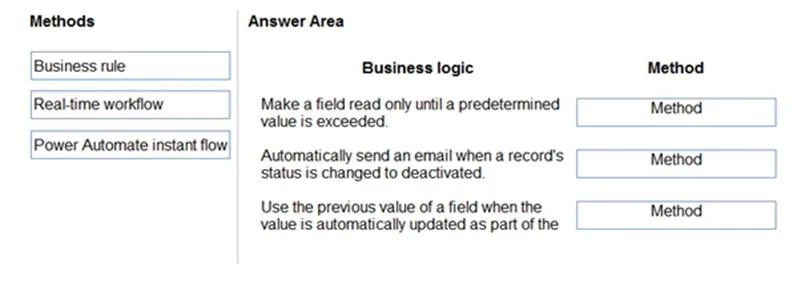
Answer Area
Drag items
Correct arrangement
- Business rule
- Real-time workflow
- Real-time workflow
Explanation
This question assesses the test-taker's ability to choose the appropriate Power Platform automation tool (Business rule, Real-time workflow, Power Automate instant flow) for specific business logic requirements within a model-driven app.
Approach. Based on the capabilities of each method and the requirements:
-
'Make a field read only until a predetermined value is exceeded.' -> Business rule: Business rules are designed for client-side logic on forms. They can dynamically show/hide fields, set field requiredness, set field read-only state, and set default values, all based on conditions evaluated on the form.
-
'Automatically send an email when a record's status is changed to deactivated.' -> Real-time workflow: Real-time workflows (synchronous workflows) in Dataverse/Dynamics 365 can be triggered by server-side events like record creation, updates, deletion, or status changes. They can perform actions such as sending emails, creating or updating records, and more. The third exhibit image specifically demonstrates a workflow configured to trigger on 'Record status changes' and not run in the background, reinforcing the concept of a real-time workflow being suitable for event-driven server-side actions like sending an email immediately upon a status change.
-
'Use the previous value of a field when the value is automatically updated as part of the...' -> Real-time workflow: Real-time workflows (and plug-ins) can access both the pre-image (the state of the record before the update) and the post-image (the state after the update). This capability is crucial for scenarios where calculations or decisions need to be made based on the change in a field's value. Business rules operate on current form values, not previous server-side values. While Power Automate can often provide before/after values for changed rows, real-time workflows are a native and efficient way to handle this within the Dataverse platform, especially if the logic needs to occur synchronously within the transaction.
Common mistakes.
- common_mistake. Common mistakes include confusing the scope and capabilities of these tools:
- Using Real-time workflow or Power Automate instant flow for 'Make a field read only': Workflows and Power Automate flows are server-side automation tools; they do not directly control user interface elements like a field's read-only state on a form. This is a client-side function best handled by Business Rules.
- Using Power Automate instant flow for 'Automatically send an email when a record's status is changed': An 'instant flow' is manually triggered. The requirement specifies 'automatically send an email', which implies an automated trigger (e.g., when a record's status changes). While an automated Power Automate flow could achieve this, 'Real-time workflow' is a more direct and often simpler in-app solution for immediate, server-side actions based on Dataverse events, and 'instant flow' specifically is the wrong type of flow.
- Using Business rule for 'Use the previous value of a field': Business rules only operate on the current values available on the form. They do not have access to the 'previous' (pre-update) state of a record on the server side. Accessing previous values for server-side comparisons is a feature of real-time workflows or plug-ins.
Concept tested. The core concept tested is the ability to differentiate and apply the appropriate Power Platform automation tools-Business Rules, Real-time workflows, and Power Automate flows-for various business logic requirements in model-driven apps, specifically understanding their scope (client-side vs. server-side), triggering mechanisms, and capabilities (e.g., UI manipulation, event-driven actions, accessing pre-images).
Topics
Community Discussion
No community discussion yet for this question.