
PL-100 · Question #42
Drag and Drop Question You are configuring a new Common Data Service environment by using the Power Apps Maker portal. You need to create an entity that uses the prefix xyz. Which four actions…
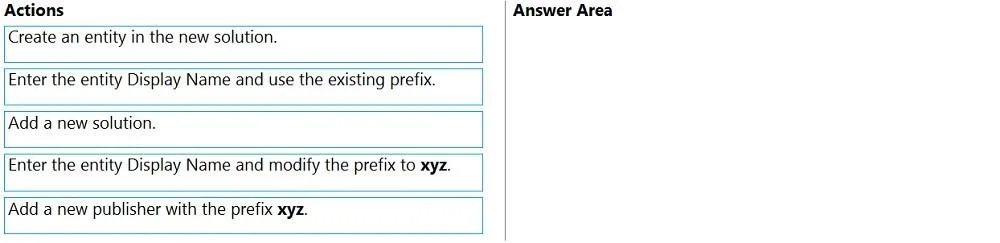
The correct answer is Add a new publisher with the prefix xyz.; Enter the entity Display Name and use the existing prefix.; Create an entity in the new solution.; Enter the entity Display Name and modify the prefix to xyz. To create a Dataverse entity with a specific prefix 'xyz', you must first define a publisher with that prefix, then create a new solution linked to that publisher, create the entity within that solution, and finally, ensure the entity's prefix is set to 'xyz' during its creation.
Question
Exhibit
Answer Area
Drag items
Correct arrangement
- Add a new publisher with the prefix xyz.
- Enter the entity Display Name and use the existing prefix.
- Create an entity in the new solution.
- Enter the entity Display Name and modify the prefix to xyz.
Explanation
To create a Dataverse entity with a specific prefix 'xyz', you must first define a publisher with that prefix, then create a new solution linked to that publisher, create the entity within that solution, and finally, ensure the entity's prefix is set to 'xyz' during its creation.
Approach. The correct sequence of actions to create an entity with the prefix 'xyz' is as follows:
-
Add a new publisher with the prefix xyz.
- Reasoning: In Dataverse (formerly Common Data Service), custom prefixes for schema names of entities (tables) and other components are defined by solution publishers. To ensure an entity uses the prefix 'xyz', you must first create a publisher that has 'xyz' as its custom prefix.
-
Add a new solution.
- Reasoning: All custom entities and other components should be created and managed within a solution. When creating a new solution, you associate it with a specific publisher. This step creates the container for your custom entity and links it to the 'xyz' publisher.
-
Create an entity in the new solution.
- Reasoning: Once a solution linked to the 'xyz' publisher is established, you can proceed to create the custom entity within that solution.
-
Enter the entity Display Name and modify the prefix to xyz.
- Reasoning: During the entity creation process, you typically enter a Display Name, and the system generates a schema name that includes the publisher's prefix. Choosing to 'modify the prefix to xyz' explicitly ensures that the entity's schema name adheres to the 'xyz' prefix, even if the system doesn't automatically default to it or if there are other default publishers that might interfere. This is a robust way to guarantee the required prefix is applied.
Common mistakes.
- common_mistake. A common mistake would be attempting to create a solution or an entity before defining a publisher with the desired prefix. Without a custom publisher, the entity would likely receive a default prefix (e.g., 'cr' or 'new_'), failing the requirement. Another incorrect choice would be to select 'Enter the entity Display Name and use the existing prefix' for the final step. While this might seem correct if the 'xyz' prefix is automatically applied, 'modify the prefix to xyz' is a more explicit and definitive action that ensures the requirement is met, regardless of the system's default behavior, and is often necessary in Power Apps/Dataverse to confirm or set custom prefixes correctly. Skipping the 'Add a new solution' step is also incorrect, as custom entities are best organized and deployed within solutions, and the publisher association happens at the solution level.
Concept tested. This question tests the understanding of solutions, publishers, and the sequential steps involved in creating custom entities (tables) with specific custom prefixes within Microsoft Dataverse (Common Data Service) using the Power Apps Maker portal.
Topics
Community Discussion
No community discussion yet for this question.