
PL-100 · Question #37
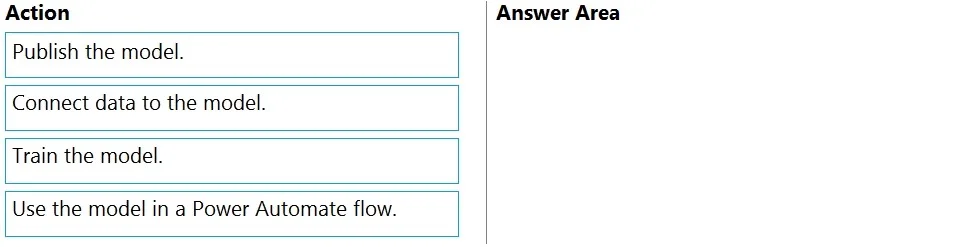
Drag and Drop Question A company uses Power Automate and Power Apps to streamline business processes. You need to use AI Builder to analyze customer reviews of the company's products. In which order…
The correct answer is Connect data to the model.; Train the model.; Publish the model.; Use the model in a Power Automate flow. The question requires ordering the steps to build and use an AI Builder model for analyzing customer reviews, starting from data connection and ending with model integration into a Power Automate flow.
Question
Exhibit
Answer Area
Drag items
Correct arrangement
- Connect data to the model.
- Train the model.
- Publish the model.
- Use the model in a Power Automate flow.
Explanation
The question requires ordering the steps to build and use an AI Builder model for analyzing customer reviews, starting from data connection and ending with model integration into a Power Automate flow.
Approach. The correct interaction is to drag the actions into the 'Answer Area' in the following sequence: 1. Connect data to the model. 2. Train the model. 3. Publish the model. 4. Use the model in a Power Automate flow. This order represents the standard lifecycle for creating and deploying an AI Builder model. First, a model needs data to learn from ('Connect data to the model'). Once the data source is established and reviewed, the model must be trained on this data ('Train the model') to develop its intelligence. After successful training, the model needs to be made available for use ('Publish the model'). Finally, once published, the model can be integrated and consumed by other Power Platform components, such as a Power Automate flow, to perform its intended task ('Use the model in a Power Automate flow'). The third exhibit image reinforces this by showing that the 'Data source' is already configured before the 'Train' button is available.
Common mistakes.
- common_mistake. Common mistakes include attempting to train a model before connecting data, publishing a model before it has been trained, or trying to use a model before it has been published. For example, if 'Train the model' was placed first, it would be incorrect because a model needs data to train on. If 'Publish the model' came before 'Train the model', it would be illogical as an untrained model cannot be published for use. Similarly, attempting to 'Use the model in a Power Automate flow' before it is 'Published' would fail because the model would not be available for consumption by other services. Each step in the correct sequence is a prerequisite for the subsequent step.
Concept tested. The core concept being tested is the understanding of the sequential workflow and lifecycle for developing, deploying, and consuming AI Builder models within the Microsoft Power Platform, specifically for tasks like text analysis (e.g., customer reviews).
Topics
Community Discussion
No community discussion yet for this question.