
PL-100 · Question #38
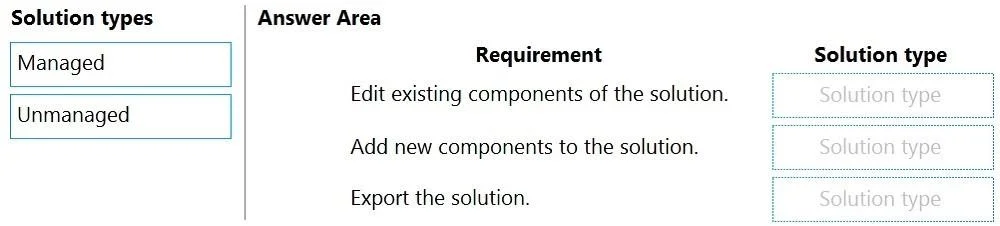
Drag and Drop Question You create multiple apps as part of an unmanaged solution. You need to move the apps to another environment. You need to pick the appropriate solution type for each…
This question tests the understanding of Microsoft Power Platform's managed and unmanaged solution types and their respective capabilities for editing, adding components, and exporting.
Question
Exhibit
Explanation
This question tests the understanding of Microsoft Power Platform's managed and unmanaged solution types and their respective capabilities for editing, adding components, and exporting.
Approach. 1. For 'Edit existing components of the solution.': Select 'Unmanaged'. Unmanaged solutions allow direct modification and customization of their components in the environment where they reside. Managed solutions do not allow direct editing of their components after installation in a target environment. 2. For 'Add new components to the solution.': Select 'Unmanaged'. Similar to editing, new components can only be added to an unmanaged solution in the development environment. Components cannot be added directly to an installed managed solution. 3. For 'Export the solution.': Select 'Managed'. While you develop in an unmanaged solution, when you are ready to deploy to another environment (especially a production or user acceptance testing environment) to 'move the apps', the best practice is to export the solution as a Managed solution. This protects the customizations in the target environment, preventing direct modifications and ensuring a clean deployment lifecycle. You export a managed solution from an environment containing the unmanaged version.
Common mistakes.
- common_mistake. A common mistake is selecting 'Managed' for editing or adding components. Managed solutions are designed to be deployed to target environments where their components are protected from direct modification, meaning you cannot edit existing components or add new ones to an installed managed solution. Another mistake would be selecting 'Unmanaged' for 'Export the solution' if the intent is to deploy to a production environment. While you can export an unmanaged solution as unmanaged, exporting as managed is the standard practice for deployment to environments where changes should be controlled by the publisher, as implied by 'moving apps to another environment' for general deployment.
Concept tested. The core technical concept being tested is the fundamental difference between Managed and Unmanaged solutions in Microsoft Power Platform (Dataverse/Dynamics 365) and their implications for solution lifecycle management, customization, and deployment strategies.
Topics
Community Discussion
No community discussion yet for this question.