
PL-100 · Question #302
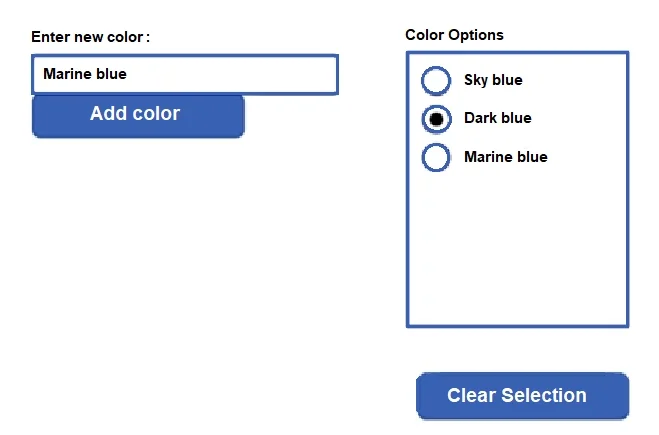
Hotspot Question Users in your company vote on color choices for marketing materials by using the following canvas app: Users enter color names into a text control and then select Add color to add…
The correct answer is If(txtColor.Value <> "", Collect(ColorList, {txtColor: txtColor.Value})) If(Value(txtColor.Text) <> "", Collect(ColorList, txtColor.Text)) If(Value(txtColor.Color) <> "", Collect(ColorList, txtColor.Color)); Reset(radioselector); Clear(ColorList). This question tests the ability to use Power Fx formulas for adding items to a collection and clearing both a collection and a control's selection in a canvas app.
Question
Exhibit
Answer Area
Drag items
Correct arrangement
- If(txtColor.Value <> "", Collect(ColorList, {txtColor: txtColor.Value})) If(Value(txtColor.Text) <> "", Collect(ColorList, txtColor.Text)) If(Value(txtColor.Color) <> "", Collect(ColorList, txtColor.Color))
- Reset(radioselector); Clear(ColorList)
Explanation
This question tests the ability to use Power Fx formulas for adding items to a collection and clearing both a collection and a control's selection in a canvas app.
Approach. For the 'User selects Add color.' action, the goal is to add the text from the input field (likely named 'txtColor') to a collection (likely named 'ColorList') when the button is clicked, but only if the input field is not empty. The correct Power Fx formula is 'If(Value(txtColor.Text) <> "", Collect(ColorList, txtColor.Text))'. Although 'Value()' is typically for converting text to numbers, in Power Apps, it can sometimes be used in conditions with implicit type coercion, where a non-empty string evaluated by 'Value()' might result in a non-empty or non-blank value, making the comparison to '""' true. 'Collect(ColorList, txtColor.Text)' correctly adds the text content of the 'txtColor' control to the 'ColorList' collection.
For the 'User selects Clear Selection.' action, the goal is to remove all items from the 'ColorList' collection and reset the 'Color Options' radio control (likely named 'radioselector'). The correct Power Fx formula is 'Reset(radioselector); Clear(ColorList)'. The 'Clear(ColorList)' function removes all records from the specified collection. The 'Reset(radioselector)' function restores the radio control to its initial state, effectively clearing any selected option.
Common mistakes.
- common_mistake. For 'User selects Add color.':
- 'If(txtColor.Value <> "", Collect(ColorList, txtColor.Value))' would be correct if 'txtColor.Value' was the property for the text, but 'txtColor.Text' is the standard property for text input content.
- 'If(Value(txtColor.Color) <> "", Collect(ColorList, txtColor.Color))' is incorrect because 'txtColor.Color' refers to the color property of the control itself, not its text content.
For 'User selects Clear Selection.':
- 'Reset(radioselector); Refresh(ColorList)' is wrong because 'Refresh()' reloads data from a data source but does not clear the collection.
- 'Revert(radioselector); Remove(ColorList)' is wrong because 'Revert()' is used to discard unsaved changes to a record, and 'Remove()' requires specifying which records to remove, not clearing the entire collection.
- 'Revert(radioselector); ClearCollect(ColorList, txtColor.Value)' is wrong because 'ClearCollect()' clears a collection and then repopulates it with new items, which would not result in an empty list if 'txtColor.Value' contains data.
Concept tested. Power Fx formulas for collection management (Collect, Clear), conditional logic (If), control property access (Text), and control reset (Reset).
Topics
Community Discussion
No community discussion yet for this question.