
PL-100 · Question #300
Drag and Drop Question You are creating a canvas app that reads and writes to a data source. You need to configure the app to perform, create and update data operations. Which functions should you…
The correct answer is Update; Patch. This question tests knowledge of Power Apps functions for data manipulation, specifically distinguishing between replacing an entire record and updating specific columns within a record.
Question
Exhibit
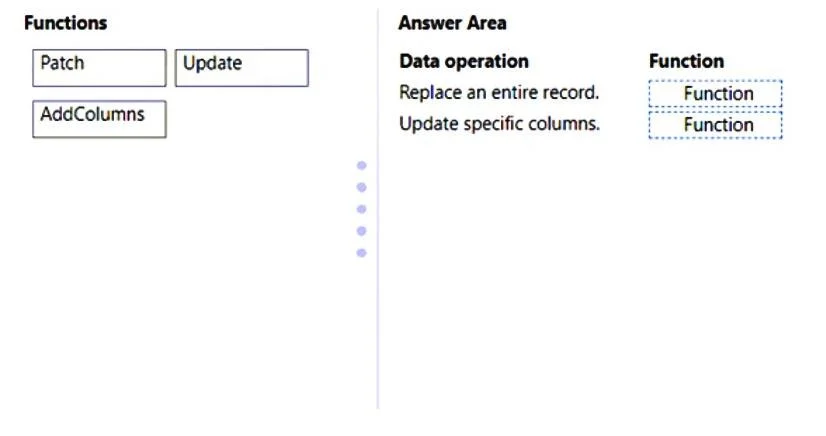
Answer Area
Drag items
Correct arrangement
- Update
- Patch
Explanation
This question tests knowledge of Power Apps functions for data manipulation, specifically distinguishing between replacing an entire record and updating specific columns within a record.
Approach. To answer correctly, the test-taker must drag the 'Update' function to the 'Replace an entire record' target and the 'Patch' function to the 'Update specific columns' target.
Here's why:
- Replace an entire record: The
Updatefunction in Power Apps is specifically designed to replace an existing record in a data source with a completely new record. It requires specifying the record to be replaced and the new record's values. - Update specific columns: The
Patchfunction is used to modify or create records in a data source. When used for updating, it allows for updating specific columns of an existing record without needing to provide all column values, effectively merging changes into the existing record. It can also be used to create new records or update multiple records at once with specific criteria.
Common mistakes.
- common_mistake. A common mistake would be to confuse the 'Patch' and 'Update' functions, or to attempt to use 'AddColumns' for updating records.
- Swapping Patch and Update: If 'Patch' is used for 'Replace an entire record' and 'Update' for 'Update specific columns', it would be incorrect. 'Patch' is for partial updates/creation, while 'Update' is for full record replacement.
- Using AddColumns: The 'AddColumns' function is used to transform a table by adding a calculated column. It does not perform data operations (create, read, update, delete) on existing records in a data source, making it irrelevant for the specified update scenarios. It's a table transformation function, not a record manipulation function.
Concept tested. Power Apps canvas app functions for data manipulation, specifically Patch and Update for modifying records in a data source, and understanding their distinct use cases.
Reference. https://learn.microsoft.com/power-apps/maker/canvas-apps/functions/function-patch, https://learn.microsoft.com/power-apps/maker/canvas-apps/functions/function-update
Topics
Community Discussion
No community discussion yet for this question.