
PL-100 · Question #299
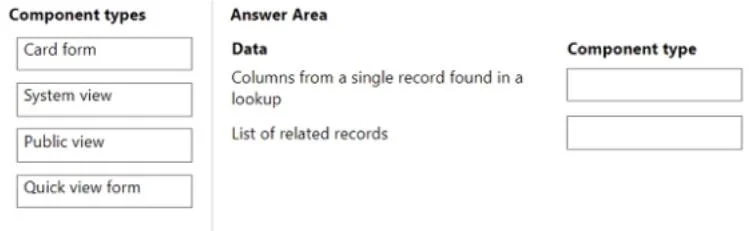
Drag and Drop Question You are creating a model-driven app. You must create new components to ensure data from related records can be displayed on a record form. You need to select the component…
The correct answer is Quick view form; System view. The question requires matching Power Apps model-driven app component types to specific data display needs on a record form, specifically for displaying related record information.
Question
Exhibit
Answer Area
Drag items
Correct arrangement
- Quick view form
- System view
Explanation
The question requires matching Power Apps model-driven app component types to specific data display needs on a record form, specifically for displaying related record information.
Approach. To answer the question correctly, the test-taker must drag 'Quick view form' to 'Columns from a single record found in a lookup' and 'System view' to 'List of related records'. A Quick view form is specifically designed to display fields from a related record (referenced by a lookup field) directly on the current record's form, providing a snapshot of that related data without needing to navigate away. For displaying a list of related records, a subgrid component is used on the form, and this subgrid is configured to use a specific view (like a System view) to define which columns are displayed and how the records are filtered and sorted. Therefore, 'System view' is the appropriate component type for defining the appearance of a list of related records.
Common mistakes.
- common_mistake. Using 'Card form' or 'Public view' incorrectly. A 'Card form' is typically used to display a condensed summary of a record within a list or gallery, not to show details of a related lookup record directly on a main form. While a 'Public view' - which is a type of view that is shared with all users - can be used in a subgrid for 'List of related records', 'System view' is a more general and fundamental component type that defines the structure and columns for displaying lists of records, including those used in subgrids. Choosing 'Card form' for either scenario or 'Public view' for 'Columns from a single record found in a lookup' would be incorrect. Quick view forms and System views (for subgrids) are the precise components for these two scenarios in model-driven apps.
Concept tested. Understanding of Power Apps model-driven app form components, specifically how to display related record data using Quick view forms and Views (System views) within subgrids.
Topics
Community Discussion
No community discussion yet for this question.