
PL-100 · Question #298
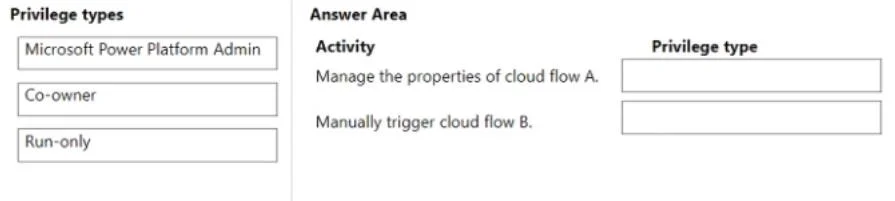
Drag and Drop Question A company uses Power Automate. You manage two cloud flows named A and B. Users must perform the following activities: - Manage the properties of cloud flow A. - Manually…
The correct answer is Co-owner; Run-only. This question tests the understanding of Power Automate cloud flow permission types (Co-owner, Run-only) and the application of the principle of least privilege for specific user activities.
Question
Exhibit
Answer Area
Drag items
Correct arrangement
- Co-owner
- Run-only
Explanation
This question tests the understanding of Power Automate cloud flow permission types (Co-owner, Run-only) and the application of the principle of least privilege for specific user activities.
Approach. To answer correctly, you must drag 'Co-owner' to 'Manage the properties of cloud flow A.' and 'Run-only' to 'Manually trigger cloud flow B.'.
'Manage the properties of cloud flow A.' requires a user to have the ability to edit, update, and possibly delete the flow. The 'Co-owner' privilege type for a specific flow grants full control over that flow, including managing its properties, editing it, and sharing it. This is the least privilege necessary to 'manage properties' compared to an environment-wide admin role.
'Manually trigger cloud flow B.' only requires the user to be able to initiate the execution of the flow. The 'Run-only' privilege type for a specific flow is designed exactly for this purpose: it allows users to run the flow without giving them permissions to modify its properties, edit its steps, or share it. This adheres strictly to the principle of least privilege for just triggering the flow.
Common mistakes.
- common_mistake. A common mistake would be to use 'Microsoft Power Platform Admin' for either activity. This role provides broad administrative control over the entire Power Platform environment, including all flows, apps, and Dataverse resources. Granting this level of access for managing a single flow's properties or just triggering another flow violates the principle of least privilege, as it provides far more permissions than necessary.
Another mistake would be to swap 'Co-owner' and 'Run-only'. Assigning 'Run-only' to 'Manage the properties' would be insufficient, as a run-only user cannot edit or manage a flow. Assigning 'Co-owner' to 'Manually trigger' would grant excessive permissions (editing, deleting, etc.) beyond just triggering the flow, again violating the principle of least privilege.
Concept tested. Power Automate cloud flow permissions (Co-owner, Run-only users, Power Platform Admin role) and the principle of least privilege in access control.
Topics
Community Discussion
No community discussion yet for this question.