
PL-100 · Question #256
Drag and Drop Question You are designing several new Microsoft Power Platform apps for a company. You have the following requirements: All apps must be able to run from the Power Apps mobile app…
The correct answer is Model driven; Canvas. To meet the requirement that all apps run from the Power Apps mobile app, Model-driven apps are best for the structured processes of Sales, and Canvas apps are best for the flexible, task-specific needs of Direct marketing.
Question
Exhibit
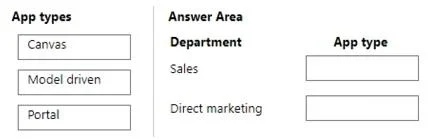
Answer Area
Drag items
Correct arrangement
- Model driven
- Canvas
Explanation
To meet the requirement that all apps run from the Power Apps mobile app, Model-driven apps are best for the structured processes of Sales, and Canvas apps are best for the flexible, task-specific needs of Direct marketing.
Approach. The core requirement is that 'All apps must be able to run from the Power Apps mobile app.'
-
Sales Department -> Model driven app: Sales departments typically require structured applications to manage customer relationships, opportunities, leads, accounts, and orders. These tasks are process-heavy and benefit from a consistent, data-centric user interface. Model-driven apps are built upon Dataverse (or Dynamics 365) and provide rich business process capabilities, forms, views, and dashboards that are ideal for managing complex business data and workflows. They automatically generate a responsive UI based on the underlying data model and business logic. Model-driven apps fully support running within the Power Apps mobile application.
-
Direct marketing -> Canvas app: Direct marketing teams might need highly customized applications for specific campaigns, field data collection, surveys, event management, or unique customer interactions. Canvas apps provide pixel-perfect control over the user interface, allowing developers to design custom experiences from a blank canvas and connect to various data sources. This flexibility is perfect for creating unique, task-specific, and visually engaging applications that can be tailored precisely to marketing initiatives. Canvas apps fully support running within the Power Apps mobile application.
Common mistakes.
- common_mistake. 1. Using 'Portal' app type: Portals (now Power Pages) are low-code websites designed for external users to interact with Dataverse data. While they are mobile-responsive and can be accessed via a web browser on a mobile device, they do not run from within the native Power Apps mobile application. The question specifically states 'All apps must be able to run from the Power Apps mobile app,' which immediately disqualifies Portal for both departments.
- Swapping 'Canvas' and 'Model driven' apps: While both app types can run on the Power Apps mobile app, their strengths align differently with department needs. A Canvas app for Sales might lack the structured process enforcement and comprehensive data views inherent in a Model-driven app, leading to a less efficient sales process. A Model-driven app for Direct marketing might be too rigid for highly customized, visually-driven marketing campaigns, limiting the flexibility needed for specific user experiences or data capture forms.
Concept tested. The underlying technical concept being tested is the understanding of different Microsoft Power Platform app types (Canvas, Model-driven, Portal/Power Pages), their primary use cases, their strengths and weaknesses, and their compatibility with the Power Apps mobile application. It assesses the ability to select the most appropriate app type based on departmental requirements and specific technical constraints.
Topics
Community Discussion
No community discussion yet for this question.