
PL-100 · Question #132
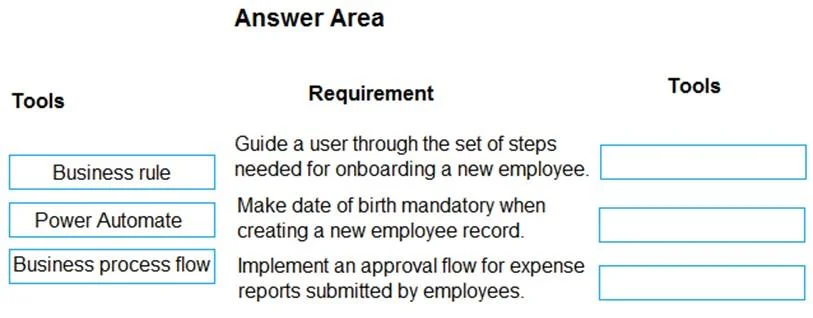
Drag and Drop Question You are creating a model-driven app for onboarding new employees. You need to implement business logic for the app. Which tool should you use? To answer, drag the appropriate…
This question assesses the ability to correctly identify and apply the appropriate Power Platform tool for implementing different types of business logic within a model-driven app scenario.
Question
Exhibit
Explanation
This question assesses the ability to correctly identify and apply the appropriate Power Platform tool for implementing different types of business logic within a model-driven app scenario.
Approach. The correct interaction is to drag 'Business process flow' to the first requirement, 'Business rule' to the second, and 'Power Automate' to the third.
- 'Guide a user through the set of steps needed for onboarding a new employee.' - A Business process flow is designed to provide a guided, multi-stage experience for users to complete a specific process, making it ideal for onboarding scenarios.
- 'Make date of birth mandatory when creating a new employee record.' - A Business rule is used to apply form-level logic, such as making fields mandatory, showing/hiding fields, setting field values, or validating data, directly on a record form in a model-driven app.
- 'Implement an approval flow for expense reports submitted by employees.' - Power Automate is the tool for building robust, multi-step automation and approval workflows that can integrate with Dataverse (the underlying platform for model-driven apps) and various other services.
Common mistakes.
- common_mistake. Common mistakes include confusing the capabilities of the different tools. For example, using a 'Business rule' for a multi-stage guided process (which is the role of a Business process flow) or attempting to implement a complex approval workflow with 'Business rules' (which are limited to client-side form logic). Conversely, using a 'Business process flow' for simple field validation would be an overkill and not its intended purpose. 'Power Automate' should not be used for simple form-level validations when 'Business rules' offer a more direct and performant solution.
Concept tested. Understanding the distinct roles and capabilities of Business Rules, Business Process Flows, and Power Automate within the Microsoft Power Platform for implementing various types of business logic, especially in the context of model-driven apps.
Topics
Community Discussion
No community discussion yet for this question.