
MS-900 · Question #91
Hotspot Question A company subscribes to Microsoft 365. You need to ensure that all administrators receive email notifications about potential service disruptions. Which three options in the Edit…
The correct answer is Azure Information Protection = No; Identity Management Service = No; Microsoft Exchange = Yes; Microsoft Intune = Yes; Mobile Device Management for Office 365 = No; Office 365 Portal = No; Office Subscription = No; Send a weekly email digest of my messages = No; Send me emails for major updates = Yes. To notify all administrators of service disruptions, you must enable major update emails and route them to a distribution list containing all admin addresses.
Question
Exhibit
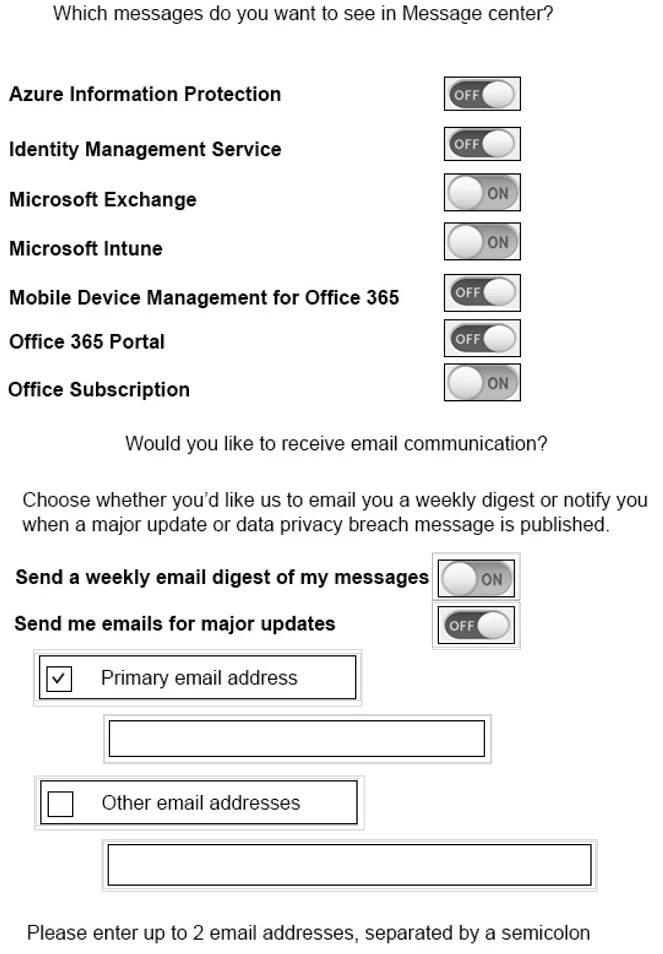
Answer Area
- Azure Information ProtectionNo
- Identity Management ServiceNo
- Microsoft ExchangeYes
- Microsoft IntuneYes
- Mobile Device Management for Office 365No
- Office 365 PortalNo
- Office SubscriptionNo
- Send a weekly email digest of my messagesNo
- Send me emails for major updatesYes
Explanation
To notify all administrators of service disruptions, you must enable major update emails and route them to a distribution list containing all admin addresses.
Approach. To ensure immediate awareness of service disruptions, you must toggle 'Send me emails for major updates' to ON. A weekly digest is not immediate enough. Because the requirement is to notify all administrators, relying solely on the 'Primary email address' (which typically belongs to a single admin) is insufficient. You must check the 'Other email addresses' box and use the corresponding text box to input an email address (such as a distribution group or shared mailbox) that includes all administrators.
Common mistakes.
- common_mistake. Selecting 'Send a weekly email digest' is incorrect because service disruptions require immediate attention, not a delayed weekly summary. Leaving only 'Primary email address' checked is incorrect because it will only notify the single primary contact, failing the requirement to notify all administrators. Selecting specific services at the top (like Exchange or Intune) only filters the messages, but does not configure the active email notification distribution.
Concept tested. Microsoft 365 Message center notification preferences and administrator communication management.
Topics
Community Discussion
No community discussion yet for this question.