
MS-721 · Question #334
Drag and Drop Question You have a Microsoft 365 subscription that uses Microsoft Teams. You need to create a resource account for a bookable desk. Which three cmdlets should you run in sequence? To…
The correct answer is Connect-ExchangeOnline; New-Mailbox; Set-CalendarProcessing. The question tests the ability to correctly sequence PowerShell cmdlets to create and configure a bookable resource account (desk) in Exchange Online for Microsoft 365.
Question
Exhibit
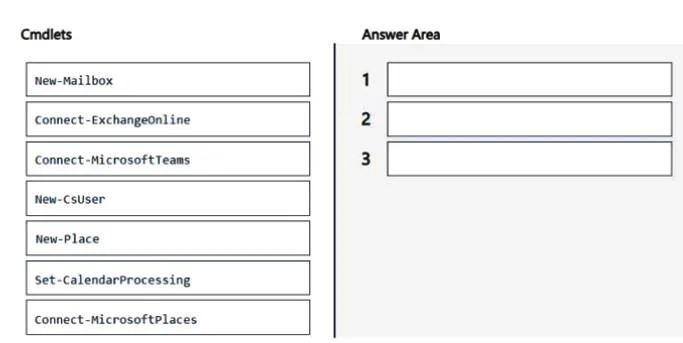
Answer Area
Drag items
Correct arrangement
- Connect-ExchangeOnline
- New-Mailbox
- Set-CalendarProcessing
Explanation
The question tests the ability to correctly sequence PowerShell cmdlets to create and configure a bookable resource account (desk) in Exchange Online for Microsoft 365.
Approach. The correct interaction is to drag and drop the cmdlets into the answer area in the following order: 'Connect-ExchangeOnline', 'New-Mailbox', 'Set-CalendarProcessing'.
- Connect-ExchangeOnline: Before managing Exchange Online resources, an administrative connection to the Exchange Online PowerShell module must be established. This cmdlet authenticates and connects the session to Exchange Online.
- New-Mailbox: To create a bookable desk, a resource mailbox (specifically a room or equipment mailbox type) is required. The 'New-Mailbox' cmdlet is used to create this mailbox object. For a desk, it would typically be created as an equipment mailbox or a room mailbox depending on the specific M365 configuration and desired categorization, but the core cmdlet is 'New-Mailbox'.
- Set-CalendarProcessing: After the resource mailbox is created, 'Set-CalendarProcessing' is essential to configure how the desk's calendar handles meeting requests. This includes enabling automatic acceptance of booking requests, setting booking delegates, and defining other booking policies, making the desk truly 'bookable'.
Common mistakes.
- common_mistake. Common mistakes include selecting incorrect connection cmdlets, creating the wrong type of object, or using an incorrect order.
- Connect-MicrosoftTeams / Connect-MicrosoftPlaces: While the scenario mentions Microsoft Teams, the core resource account for a bookable desk is an Exchange Online resource mailbox. Connecting to Teams or Microsoft Places (a different location intelligence service) is not the primary or initial step for creating the Exchange Online resource mailbox.
- New-CsUser / New-Place: 'New-CsUser' is for creating a Skype for Business/Teams user, not an Exchange resource mailbox. 'New-Place' is related to Microsoft Places and not for creating an Exchange resource mailbox directly.
- Incorrect Order: Attempting to create a mailbox before connecting to Exchange Online, or trying to configure calendar processing before the mailbox exists, would result in errors.
- Missing Set-CalendarProcessing: Simply creating a mailbox with 'New-Mailbox' is insufficient to make it 'bookable' with automated responses and policies; 'Set-CalendarProcessing' is crucial for this functionality.
Concept tested. The core technical concept being tested is the creation and configuration of resource mailboxes (specifically room or equipment mailboxes for a bookable desk) in Microsoft 365 using Exchange Online PowerShell, including the necessary connection, object creation, and subsequent configuration of calendar processing.
Topics
Community Discussion
No community discussion yet for this question.