
MS-721 · Question #317
Drag and Drop Question You have a Microsoft Teams deployment. You plan to deploy Teams Rooms. The solution must meet the following requirements: - Support one-touch join to third-party online…
The correct answer is Direct Guest Join; Companion mode. This drag-and-drop question tests knowledge of Microsoft Teams Rooms features, specifically how to enable one-touch join for third-party meetings and facilitate content casting from user devices.
Question
Exhibit
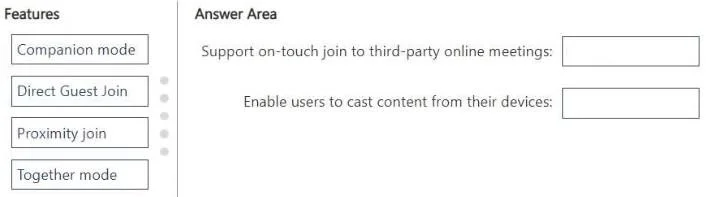
Answer Area
Drag items
Correct arrangement
- Direct Guest Join
- Companion mode
Explanation
This drag-and-drop question tests knowledge of Microsoft Teams Rooms features, specifically how to enable one-touch join for third-party meetings and facilitate content casting from user devices.
Approach. To correctly answer the question, the test-taker must drag 'Direct Guest Join' to 'Support on-touch join to third-party online meetings' and 'Companion mode' to 'Enable users to cast content from their devices'. 'Direct Guest Join' is specifically designed to allow Microsoft Teams Rooms to join meetings hosted on other platforms (like Zoom or Webex) with a single touch from the room console, fulfilling the requirement for 'one-touch join to third-party online meetings'. 'Companion mode' enables users to connect their personal device (laptop, phone) to the Teams Room system during a meeting to share content wirelessly to the room display, fulfilling the requirement to 'cast content from their devices'. Companion mode enhances the in-room experience by allowing personal device participation for various functions, including content sharing/casting.
Common mistakes.
- common_mistake. A common mistake would be to confuse 'Proximity join' with either requirement. 'Proximity join' allows users to discover and add nearby Teams Rooms to a Teams meeting from their personal device, using Bluetooth. It does not facilitate third-party meeting joins or general content casting outside of the Teams meeting context. 'Together mode' is a specific meeting layout in Microsoft Teams that places participants in a shared virtual space and has no relation to joining third-party meetings or casting content. Incorrectly associating these features with the given requirements would lead to wrong answers. Forgetting that Companion mode includes content casting capabilities is another potential error.
Concept tested. Microsoft Teams Rooms capabilities and features, specifically related to interoperability with third-party meeting platforms and in-room content sharing options.
Reference. null
Topics
Community Discussion
No community discussion yet for this question.