
MS-721 · Question #304
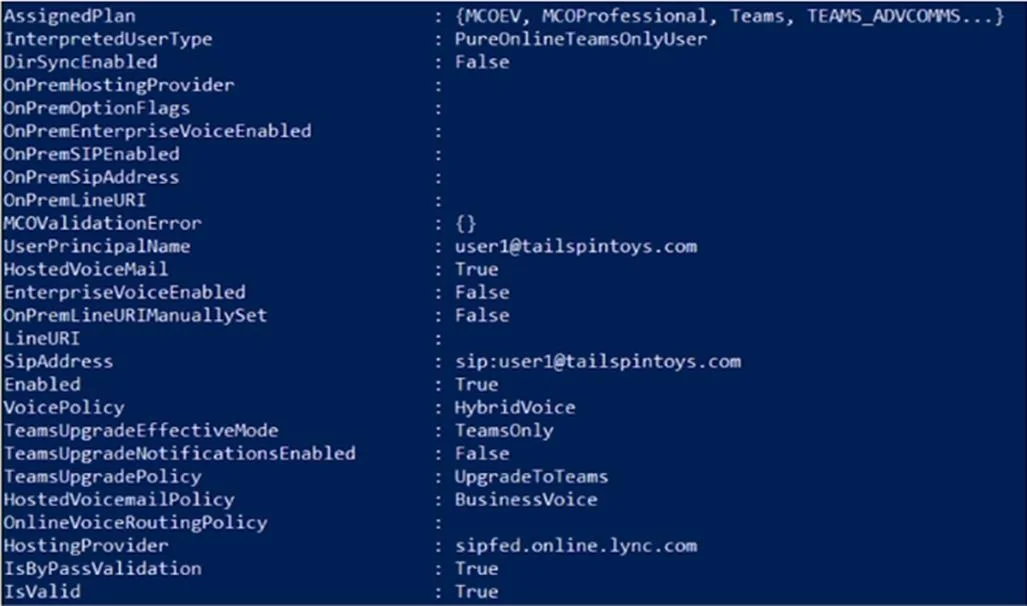
Your company has a Microsoft Teams Phone deployment that uses Direct Routing. A user named User1 reports that she cannot make calls because the dial pad is missing in Teams. You run the…
The correct answer is A. Run the Set-CsPhoneNumberAssignment cmdlet and specify the -PhoneNumber parameter. B. Assign a Microsoft Teams Phone Standard license to User1. When the dial pad is missing in Teams for a Direct Routing user, two conditions must be met. First, the user must have a Microsoft Teams Phone Standard license (B) - without it, the PSTN calling features including the dial pad are not activated in the Teams client. Second, a…
Question
Exhibit
Options
- ARun the Set-CsPhoneNumberAssignment cmdlet and specify the -PhoneNumber parameter.
- BAssign a Microsoft Teams Phone Standard license to User1.
- CRun the New-CsHybridTelephoneNumber and specify the -TelephoneNumber parameter.
- DRun the Grant-CsOnlineVoiceRoutingPolicy cmdlet.
How the community answered
(48 responses)- A79% (38)
- C6% (3)
- D15% (7)
Explanation
When the dial pad is missing in Teams for a Direct Routing user, two conditions must be met. First, the user must have a Microsoft Teams Phone Standard license (B) - without it, the PSTN calling features including the dial pad are not activated in the Teams client. Second, a phone number must be assigned to the user via Set-CsPhoneNumberAssignment with the -PhoneNumber parameter (A) - the dial pad only appears when a DID is assigned. The Get-CsOnlineUser output would reveal a missing license (no FeatureTypes entry for PhoneSystem) and no LineUri value. While a voice routing policy (D) is also required for Direct Routing to function, the exhibit implies it is already present; the missing elements are the license and phone number assignment.
Topics
Community Discussion
No community discussion yet for this question.