
MS-721 · Question #289
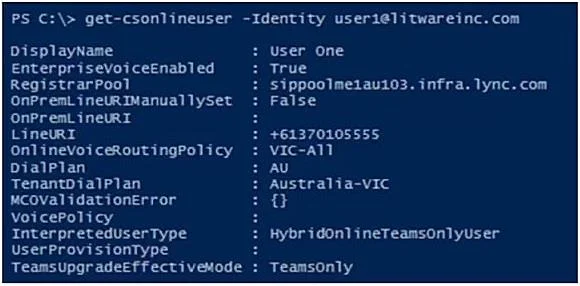
You have a Microsoft Teams Phone deployment. The 613 7010 5XXX phone number range is allocated to the Session Border Controller (SBC). A user named User1 is configured as shown in the following…
The correct answer is A. Grant-CsCallingLineIdentity -Identity [email protected] -PolicyName CallerID D. Set-CsPhoneNumberAssignment -Identity [email protected] -PhoneNumber +61370105555. User1 has two separate issues: no phone number assigned (causing inbound call failures from the PSTN) and no Caller ID policy applied (causing missing caller ID on outbound calls). Two commands are required because each resolves a distinct problem.
Question
Exhibit
Options
- AGrant-CsCallingLineIdentity -Identity [email protected] -PolicyName CallerID
- BGrant-CsOnlineVoiceRoutingPolicy -Identity [email protected] -PolicyName $null
- CRemove-CsPhoneNumberAssignment -Identity [email protected] -PhoneNumber
- DSet-CsPhoneNumberAssignment -Identity [email protected] -PhoneNumber +61370105555
- ESet-CsPhoneNumberAssignment -Identity [email protected] -EnterpriseVoiceEnabled $true
How the community answered
(49 responses)- A84% (41)
- B6% (3)
- C2% (1)
- E8% (4)
Why each option
User1 has two separate issues: no phone number assigned (causing inbound call failures from the PSTN) and no Caller ID policy applied (causing missing caller ID on outbound calls). Two commands are required because each resolves a distinct problem.
Grant-CsCallingLineIdentity assigns the CallerID policy to User1, which defines what phone number or identity is presented to recipients during outbound calls, directly resolving the missing caller ID symptom. Without this policy assignment, Teams has no configured caller ID to present on outbound calls. This is the correct fix for the outbound caller ID issue.
Setting the OnlineVoiceRoutingPolicy to $null removes the voice routing policy from User1 entirely, which would disable outbound PSTN calling rather than fix any reported issue.
Remove-CsPhoneNumberAssignment removes an existing number assignment rather than adding one, which would worsen the inbound routing failure instead of resolving it.
Set-CsPhoneNumberAssignment with -PhoneNumber +61370105555 assigns a Direct Routing number from the SBC's allocated 613 7010 5XXX range to User1, enabling the PSTN to route inbound calls correctly to the user's Teams client. Without a phone number assignment, inbound calls have no destination in Teams, causing the error the external caller receives.
Since User1 can already make outbound calls, Enterprise Voice is already enabled, so setting EnterpriseVoiceEnabled to $true on the number assignment would be redundant and resolves neither the inbound error nor the missing caller ID.
Concept tested: Teams Direct Routing number assignment and Caller ID policy
Source: https://learn.microsoft.com/en-us/microsoftteams/set-the-caller-id-for-a-user
Topics
Community Discussion
No community discussion yet for this question.