
MS-721 · Question #166
Case Study 3 - Contoso, Ltd Overview Company Information Contoso, Ltd. is an international manufacturing company that has 2,000 employees. Contoso currently uses a third-party meeting service. The…
The correct answer is Instruct the user to configure a digital voice profile.; Configure and assign a meeting policy.; Join a Teams meeting and start a transcription. The correct actions address issues with locating meeting recordings, initiating transcription for content review, and improving speaker identification in transcripts.
Question
Exhibit
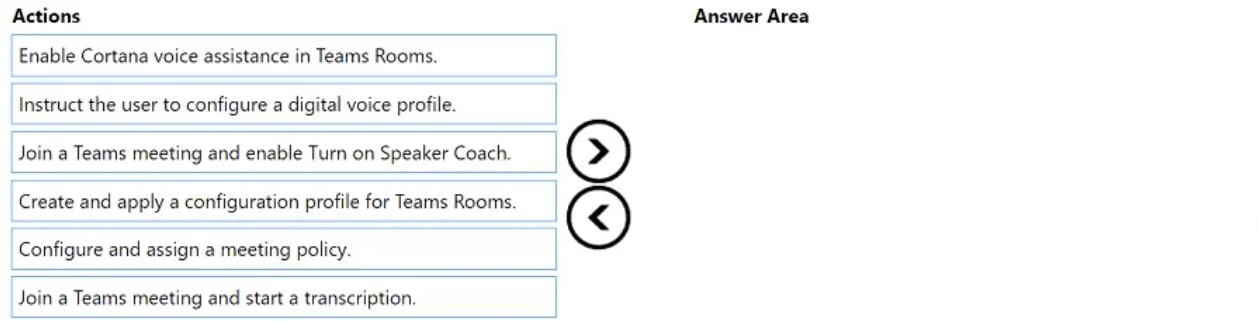
Answer Area
Drag items
Correct arrangement
- Instruct the user to configure a digital voice profile.
- Configure and assign a meeting policy.
- Join a Teams meeting and start a transcription.
Explanation
The correct actions address issues with locating meeting recordings, initiating transcription for content review, and improving speaker identification in transcripts.
Approach. The correct approach involves selecting and dragging the three actions shown in the second exhibit image into the answer area. These actions address specific issues or needs within the Contoso Ltd. scenario:
- Configure and assign a meeting policy: This action directly addresses the problem 'A user in the London office cannot locate the recorded files from a recurring Teams meeting.' Teams meeting policies govern recording behavior, including whether meetings are recorded, who can record, and crucially, recording retention and storage locations. By properly configuring and assigning a meeting policy, an administrator can ensure that recordings are made and are locatable by the users, solving the core issue.
- Join a Teams meeting and start a transcription: This action addresses the need for a text record of meeting discussions. While a meeting policy can enable transcription by default, for specific meetings or if the problem (potentially the cut-off one) relates to needing a searchable text version of what was said, manually starting a transcription in a meeting is the direct solution. Transcripts are essential for reviewing meeting content quickly or searching for specific information without watching the entire recording.
- Instruct the user to configure a digital voice profile: This action is relevant for improving the accuracy of speaker identification in live captions and meeting transcripts. When users configure their digital voice profile, Teams can more accurately attribute spoken text to the correct individual (e.g., 'John Doe said...') in the transcript, enhancing the usability and clarity of meeting outputs. This would be a solution if the implied third problem relates to inaccurate speaker attribution.
Common mistakes.
- common_mistake. A common mistake would be to select actions that do not directly address the problems presented or implied, or to ignore the specific actions pre-selected in the second exhibit image. For example:
- 'Create and apply a configuration profile for Teams Rooms': This action would be the correct solution for the problem of executives encountering MFA prompts on Surface Hubs. However, it is not one of the three actions shown in the 'Answer Area' in the second exhibit image, indicating it is not the intended answer for this specific sub-question, despite being relevant to another problem in the case study. It's important to select only the options presented as correct in the solved example.
- 'Enable Cortana voice assistance in Teams Rooms': While a feature for Teams Rooms, enabling Cortana assistance does not resolve issues related to locating recordings, MFA prompts, or improving speaker identification.
- 'Join a Teams meeting and enable Turn on Speaker Coach': Speaker Coach provides personal feedback to the speaker on their delivery (pacing, intonation, etc.) and does not address the administrative issues of recording availability, authentication, or general transcription/speaker identification for the entire meeting output.
Concept tested. Microsoft Teams administration, meeting policies, recording management, transcription, and user-facing productivity features like speaker identification and voice profiles.
Topics
Community Discussion
No community discussion yet for this question.