
MS-721 · Question #165
Case Study 3 - Contoso, Ltd Overview Company Information Contoso, Ltd. is an international manufacturing company that has 2,000 employees. Contoso currently uses a third-party meeting service. The…
The correct answer is Unassign +1416555555.; Change the usage type of +1416555555.; Assign +1416555555 to a new resource account for the reception area. Reconfiguring an existing Teams Phone number for a new resource account requires unassigning it from its current use, potentially changing its usage type, and then assigning it to the new resource account for proper functionality.
Question
Exhibit
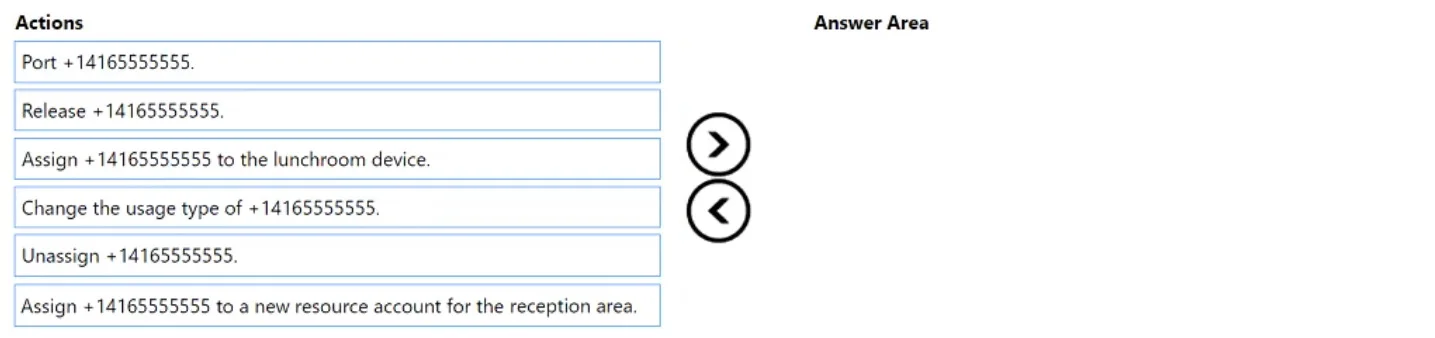
Answer Area
Drag items
Correct arrangement
- Unassign +1416555555.
- Change the usage type of +1416555555.
- Assign +1416555555 to a new resource account for the reception area.
Explanation
Reconfiguring an existing Teams Phone number for a new resource account requires unassigning it from its current use, potentially changing its usage type, and then assigning it to the new resource account for proper functionality.
Approach. The problem statement (implied by the solution) requires correctly setting up the phone number +14165555555 for the reception area using a new resource account, even though it's already 'configured to use' this number. This suggests a re-provisioning or a proper setup using modern Teams Phone capabilities. The correct interaction involves dragging the following three actions into the 'Answer Area' in the specified order:
- Unassign +14165555555: If the phone number is currently assigned to a user, a common area phone, or an older resource account, it must first be unassigned to free it up for its new configuration. This makes the number available in the tenant's number pool for reassignment.
- Change the usage type of +14165555555: Resource accounts (which are used for common area phones, auto attendants, or call queues) require a specific usage type, typically 'Service' numbers, distinct from direct-dial user numbers. If the number was previously assigned to a user or had a different usage type, this step is crucial to ensure it can be correctly assigned to a resource account.
- Assign +14165555555 to a new resource account for the reception area: This is the final step, where the now-available and correctly typed phone number is linked to the new resource account created for the reception area. This ensures the reception area has a dedicated and properly configured phone line in Teams.
Common mistakes.
- common_mistake. Common mistakes include selecting irrelevant actions or performing the steps in the wrong order:
- Selecting 'Port +14165555555' or 'Release +14165555555': Porting involves moving a number between different telecom carriers, which is not applicable here as the number is already in Teams via Operator Connect. Releasing a number makes it permanently available in the tenant's number pool, potentially for others to claim, but the goal is to re-use it immediately for a specific purpose within the same tenant.
- Selecting 'Assign +14165555555 to the lunchroom device': This action is for a different location and device, not the reception area, and thus does not address the problem.
- Incorrect Order of Operations: Attempting to 'Assign' the number before 'Unassigning' it from its current holder will fail because the number is already in use. Similarly, if the 'Change usage type' is required and not performed before the 'Assign' step, the assignment might fail or not function as intended for a resource account. The logical flow is to free the number, prepare it, and then assign it.
Concept tested. Microsoft Teams Phone System administration, including managing phone numbers (unassigning, changing usage types, and assigning), understanding the purpose of resource accounts for common area phones and shared devices, and the sequential steps involved in re-provisioning phone numbers within a Microsoft Teams tenant.
Topics
Community Discussion
No community discussion yet for this question.