
MS-721 · Question #134
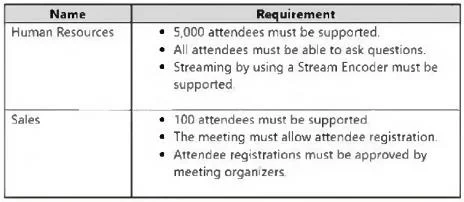
Drag and Drop Question You have a Microsoft Teams deployment. You have two teams that have meeting requirements as shown in the following table. You need to recommend which type of meeting to use…
The correct answer is Live event; Webinar. The question assesses the ability to choose the correct Microsoft Teams meeting type for different organizational needs based on attendee limits, interaction features, and registration requirements.
Question
Exhibit
Answer Area
Drag items
Correct arrangement
- Live event
- Webinar
Explanation
The question assesses the ability to choose the correct Microsoft Teams meeting type for different organizational needs based on attendee limits, interaction features, and registration requirements.
Approach. For the 'Human Resources' team, the key requirements are 5,000 attendees, all able to ask questions, and support for a Stream Encoder. Microsoft Teams 'Live events' are designed for large-scale broadcasts, supporting up to 10,000 attendees by default (and more with specific licenses or during promotions), allowing Q&A, and integrating with external encoders for professional streaming. Therefore, 'Live event' is the correct choice for Human Resources. For the 'Sales' team, the requirements are 100 attendees, attendee registration, and organizer approval of registrations. Microsoft Teams 'Webinars' provide robust features for managing attendee registration, including customizable registration pages and the ability for organizers to approve registrations before the event. Webinars typically support up to 1,000 interactive attendees. Therefore, 'Webinar' is the correct choice for Sales. The correct interaction is to drag 'Live event' to the 'Human Resources' target and 'Webinar' to the 'Sales' target.
Common mistakes.
- common_mistake. Using 'Teams meeting' for Human Resources would be incorrect because standard Teams meetings are limited to 1,000 participants (or up to 1,000 interactive participants and 10,000 view-only participants with Advanced Communications add-on), which does not meet the 5,000 attendee requirement, and while they can integrate with some streaming, 'Live event' is specifically designed for encoder-based broadcasts. Using 'Teams meeting' for Sales would be incorrect as, while it supports some registration, it lacks the specific feature for 'attendee registrations must be approved by meeting organizers' which is a core feature of Teams Webinars. 'Virtual appointment' is intended for one-on-one or small group engagements, not for 100 or 5,000 attendees. Using 'Webinar' for Human Resources would not support 5,000 attendees, as webinars are typically limited to 1,000 interactive participants. Conversely, using 'Live event' for Sales would lack the specific robust registration and approval workflow provided by Webinars for managing a specific attendee list for a moderately sized event.
Concept tested. Understanding the features, attendee limits, and use cases of different Microsoft Teams meeting types (Teams meeting, Live event, Webinar, Virtual appointment) to match them with specific business requirements.
Topics
Community Discussion
No community discussion yet for this question.