
MS-720 · Question #115
Drag and Drop Question Your company has Microsoft 365 E1 licenses. The company is based in the USA and uses Teams for communication. The CEO of the company wants users to be able to call numbers of…
The correct answer is Purchase a Phone System add-on license.; Purchase a Domestic and International Calling Plan.; Obtain phone numbers for the company's users through the Teams admin center.; Instruct the users to check their Teams environments. Explanation: Teams Calling Plan Setup (Microsoft 365 E1) Context Microsoft 365 E1 licenses include Teams for chat/meetings but do not include Phone System (the PBX engine needed for PSTN calls) or any Calling Plan. Both must be purchased separately before users can dial…
Question
Exhibit
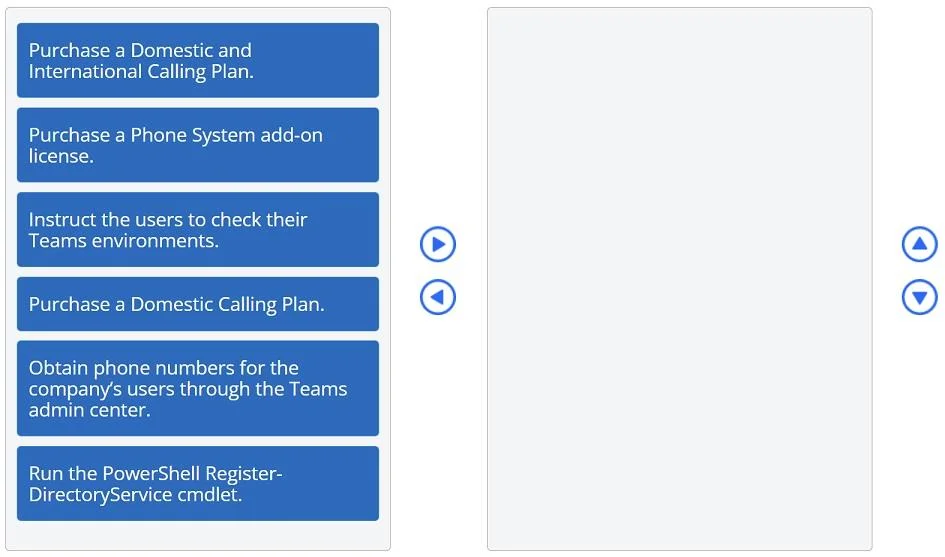
Answer Area
Drag items
Correct arrangement
- Purchase a Phone System add-on license.
- Purchase a Domestic and International Calling Plan.
- Obtain phone numbers for the company's users through the Teams admin center.
- Instruct the users to check their Teams environments.
Explanation
Explanation: Teams Calling Plan Setup (Microsoft 365 E1)
Context
Microsoft 365 E1 licenses include Teams for chat/meetings but do not include Phone System (the PBX engine needed for PSTN calls) or any Calling Plan. Both must be purchased separately before users can dial external phone numbers.
The CEO's requirement - calling European numbers from the USA - means international calling is needed, which determines which calling plan to buy.
Why Each Item Is in This Position
1. Purchase a Phone System add-on license
Phone System is the foundational prerequisite for any PSTN calling in Teams. It's the cloud PBX layer that gives Teams the ability to place and receive real phone calls. Without it, Calling Plans cannot be assigned and phone numbers cannot be provisioned. This must be the first step because everything else depends on it.
2. Purchase a Domestic and International Calling Plan
Once Phone System is licensed, you attach a Calling Plan to provide actual call minutes and PSTN access. The Domestic-only plan is the distractor here - it covers calls within the user's country (USA), but the scenario explicitly requires calling European numbers, which is international. The Domestic and International plan is the only option that satisfies the requirement.
3. Obtain phone numbers for the company's users through the Teams admin center
Phone numbers can only be acquired and assigned after both Phone System and a Calling Plan are in place. The Teams admin center's number provisioning interface won't function correctly without those licenses active. This step assigns real phone numbers to each user's Teams account.
4. Instruct the users to check their Teams environments
This is the final verification step. After the admin completes all configuration, users need to confirm that calling functionality appears correctly in their Teams client (dial pad visible, calls working). This is a user-side validation, not an admin action, so it comes last.
Why the Distractors Are Wrong
| Distractor | Why It's Wrong |
|---|---|
| Purchase a Domestic Calling Plan | Only covers calls within the USA. Calling European numbers is international - this plan would not enable it. |
| Run the PowerShell Register-DirectoryService cmdlet | This cmdlet does not exist in the context of Teams calling setup. It is a fabricated distractor designed to mislead. Real Teams PowerShell work (e.g., Grant-CsOnlineVoiceRoutingPolicy) is not required here since Calling Plans are a simpler path than Direct Routing. |
Common Mistakes
- Choosing Domestic over International - The most frequent error. Candidates focus on "USA company" and forget the destination (Europe) determines the plan type.
- Skipping Phone System - Assuming E1 includes calling capability. It does not; Phone System is always an add-on for E-series licenses below E5.
- Reversing steps 2 and 3 - Trying to get phone numbers before having a Calling Plan in place will fail; the admin center requires both licenses to be active first.
- Including the PowerShell cmdlet - The cmdlet sounds technical and plausible but has no role in a standard Calling Plan deployment.
Topics
Community Discussion
No community discussion yet for this question.