
MS-720 · Question #108
Drag and Drop Question You have a Microsoft Teams Phone deployment in an office. When a user dials an emergency number, the safety team for the office is notified. Your company opens a new office…
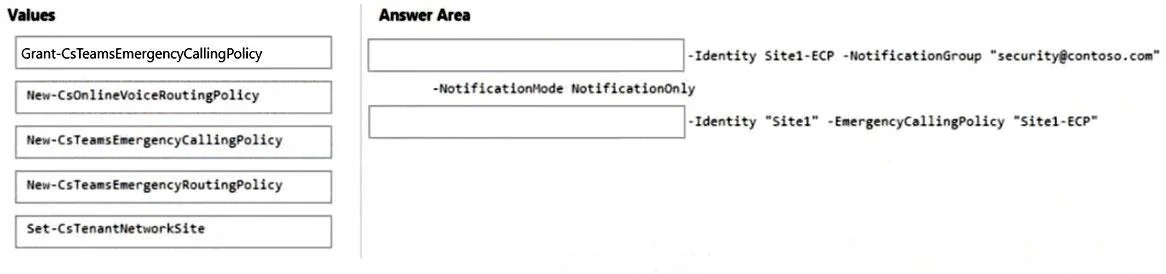
The correct answer is New-CsTeamsEmergencyCallingPolicy; -NotificationMode NotificationOnly; Grant-CsTeamsEmergencyCallingPolicy; Grant-CsTeamsEmergencyCallingPolicy. To configure emergency call notifications for a new Microsoft Teams Phone office, you must first create a new emergency calling policy and then assign it to the relevant network site.
Question
Exhibit
Answer Area
Drag items
Correct arrangement
- New-CsTeamsEmergencyCallingPolicy
- -NotificationMode NotificationOnly
- Grant-CsTeamsEmergencyCallingPolicy
- Grant-CsTeamsEmergencyCallingPolicy
Explanation
To configure emergency call notifications for a new Microsoft Teams Phone office, you must first create a new emergency calling policy and then assign it to the relevant network site.
Approach. The scenario requires setting up emergency call notifications for a new office. This involves two primary steps in Microsoft Teams Phone configurations using PowerShell:
-
Create a new emergency calling policy: The first blank command includes parameters like
-Identity Site1-ECP,-NotificationGroup "[email protected]", and-NotificationMode NotificationOnly. These parameters are specific to defining an emergency calling policy that includes notification details. The cmdletNew-CsTeamsEmergencyCallingPolicyis designed precisely for this purpose-to create a new emergency calling policy. Thus,New-CsTeamsEmergencyCallingPolicyis dragged to the first blank. -
Assign the policy to the relevant scope (the new office/site): The second blank command includes
-Identity "Site1"and-EmergencyCallingPolicy "Site1-ECP". This indicates the action of applying the previously created policy (Site1-ECP) to a specific entity, likely a tenant network site representing the 'Site1' office. TheGrant-CsTeamsEmergencyCallingPolicycmdlet is used to assign an emergency calling policy to either a user or a tenant network site. While the typical parameter for a site is-TenantSite, in the context of a drag-and-drop question with given options,Grant-CsTeamsEmergencyCallingPolicyis the only appropriate cmdlet for assigning a policy. Thus,Grant-CsTeamsEmergencyCallingPolicyis dragged to the second blank.
Common mistakes.
- common_mistake. 1. Using
New-CsOnlineVoiceRoutingPolicyorNew-CsTeamsEmergencyRoutingPolicy: These cmdlets are used for creating voice routing policies or emergency routing policies, which define how emergency calls are routed to the Public Switched Telephone Network (PSTN) gateway, not for defining the emergency calling policy itself or its notification settings. The question specifically concerns 'emergency number' and 'safety team notified', pointing to an emergency calling policy, not routing.
- Using
Set-CsTenantNetworkSite: This cmdlet is used to modify an existing tenant network site's properties (like address, location data) but not to assign a policy to it. Policies are 'granted' or 'assigned' usingGrant-Cscmdlets. - Confusing
New-CsTeamsEmergencyCallingPolicywithGrant-CsTeamsEmergencyCallingPolicy: One creates the policy, the other assigns it. UsingGrant-CsTeamsEmergencyCallingPolicyto create the policy orNew-CsTeamsEmergencyCallingPolicyto assign it would be incorrect due to the distinct functions of 'New' (create) and 'Grant' (assign) cmdlets.
Concept tested. Microsoft Teams Phone System emergency calling policies, specifically the creation of a new emergency calling policy with notification settings and its assignment to a tenant network site or scope using PowerShell.
Topics
Community Discussion
No community discussion yet for this question.