
MS-720 · Question #105
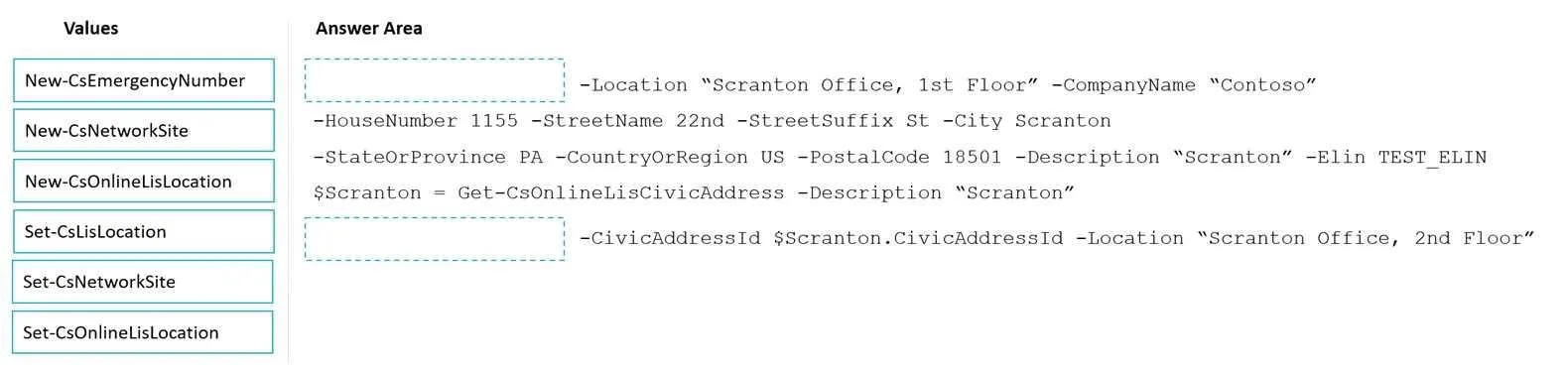
Drag and Drop Question Your company has offices throughout the United States. The company is opening a new office in Scranton. The office will occupy two floors in the same building. You need to…
The correct answer is New-CsOnlineLisLocation; New-CsEmergencyNumber; Set-CsOnlineLisLocation. Microsoft Teams E911 Location Configuration - Script Completion This question tests knowledge of Microsoft Teams Location Information Service (LIS) cmdlets used to configure Enhanced 911 (E911) so emergency dispatchers receive floor-level granularity when a call is placed…
Question
Exhibit
Answer Area
Drag items
Correct arrangement
- New-CsOnlineLisLocation
- New-CsEmergencyNumber
- Set-CsOnlineLisLocation
Explanation
Microsoft Teams E911 Location Configuration - Script Completion
This question tests knowledge of Microsoft Teams Location Information Service (LIS) cmdlets used to configure Enhanced 911 (E911) so emergency dispatchers receive floor-level granularity when a call is placed.
The Scenario
Two floors, same building. Emergency services must know which floor the call originated from. That requires two distinct LIS location records - one per floor - each tied to an emergency number.
Why This Specific Order
Position 1: New-CsOnlineLisLocation
What it does: Creates a new LIS location record containing civic address details plus granular location info (e.g., floor number, suite).
Why it's first: Everything else depends on the location record existing. You cannot associate an emergency number with a location that hasn't been created yet. Since there are two floors, this cmdlet would be called twice - once per floor.
Position 2: New-CsEmergencyNumber
What it does: Defines an Emergency Location Identification Number (ELIN) or emergency calling configuration entry that gets routed to Public Safety Answering Points (PSAPs).
Why it's second: The emergency number must be created after the location exists (so it can reference or be associated with it) but before you update the location to link them together in the final step.
Position 3: Set-CsOnlineLisLocation
What it does: Updates/modifies an existing LIS location - in this context, used to associate the emergency number created in step 2 with the location created in step 1.
Why it's last: This is a Set (modify) operation, not a New (create) operation. Both the location and the emergency number must already exist before you can link them. Calling this first or second would fail because the objects it references don't exist yet.
Why the Distractors Are Wrong
| Cmdlet | Why It's Incorrect |
|---|---|
New-CsNetworkSite | Creates network sites for Call Admission Control (CAC), not E911 location mapping |
Set-CsLocation | Not a valid Teams Online cmdlet; relates to older on-premises Skype for Business |
New-CsEmergencySite | Not a real cmdlet in the Teams Online PowerShell module |
Common Misconceptions
- Confusing
New-CsNetworkSitewith LIS configuration - network sites control bandwidth policies, not emergency location data. - Thinking
Set-CsOnlineLisLocationcan come before the emergency number is created - it cannot reference an object that doesn't exist yet. - Assuming one location record covers both floors - E911 floor-level dispatch requires separate location records per floor, which is exactly why
New-CsOnlineLisLocationis run per floor.
Topics
Community Discussion
No community discussion yet for this question.