nerdexam
Microsoft

MB-800 · Question #281

Drag and Drop Question A company is implementing Dynamics 365 Business Central. The customer service team communicates daily with the customers by using Outlook. The customer service team requires…

The correct answer is Contact insights; Contact insights; Document Link. Dynamics 365 Business Central – Outlook Add-in Options Explained The Three Requirements vs. Correct Answers | # | Requirement | Correct Option | |---|---|---| | 1 | Look up a business contact when composing an email | Contact insights | | 2 | Create a sales quote and send it…

Set up Business Central

Question

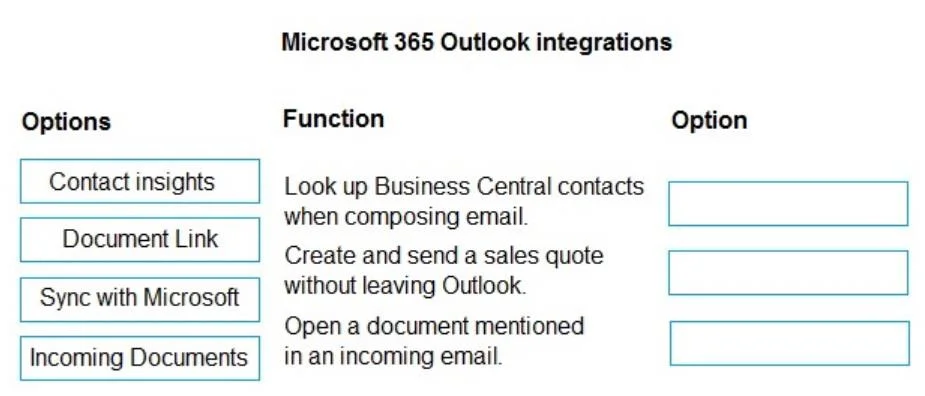
Drag and Drop Question A company is implementing Dynamics 365 Business Central. The customer service team communicates daily with the customers by using Outlook. The customer service team requires the following functionality in Outlook: - Look up a business contact in Business Central when composing an email. - Create a sales quote and send it back to a customer without leaving Outlook. - Open a document in Business Central from the document number mentioned in an incoming email. You recommend that the team install the Business Central add-in for Outlook. You need to recommend which add-in options the customer service team should use to meet the requirements. Which options should you recommend? To answer, move the appropriate options to the correct functions. You may use each option once, more than once, or not at all. You may need to move the split bar between panes or scroll to view content. Answer:

Exhibit
MB-800 question #281 exhibit

Answer Area

Drag items

Contact insightsDocument LinkSync with MicrosoftIncoming Documents

Correct arrangement

  • Contact insights
  • Contact insights
  • Document Link

Explanation

Dynamics 365 Business Central – Outlook Add-in Options Explained

The Three Requirements vs. Correct Answers

#RequirementCorrect Option
1Look up a business contact when composing an emailContact insights
2Create a sales quote and send it without leaving OutlookContact insights
3Open a BC document from a document number in an incoming emailDocument Link

Item-by-Item Explanation

Placement 1 - Contact insights (Requirement: Look up a contact)

The Contact insights pane activates when you open or compose an email. It automatically detects the email address and surfaces the matching Business Central customer/vendor record - including contact details, transaction history, and outstanding balances - directly inside Outlook. This is its core purpose.

Placement 2 - Contact insights (Requirement: Create a sales quote without leaving Outlook)

The same Contact insights add-in also exposes action buttons that let you create Business Central documents (sales quotes, invoices, etc.) from within the Outlook pane. Once created, the document can be emailed back to the customer - all without switching applications. A common mistake is assuming this requires a different add-in. Both requirements 1 and 2 are served by the same Contact insights add-in.

Placement 3 - Document Link (Requirement: Open a BC document from a number in an incoming email)

Document Link scans the body of incoming emails for recognized Business Central document numbers (e.g., "SO-1042") and renders them as clickable hyperlinks. Clicking one opens the corresponding document directly in Business Central. This is specifically designed for the inbound email scenario.


Common Mistakes & Misconceptions

  • "Incoming Documents" sounds right for #3 - It doesn't belong here. Incoming Documents is a BC feature for capturing external files (e.g., vendor PDF invoices) to create purchase records. It is not an Outlook add-in action for navigating to BC documents from email text.
  • "Sync with Microsoft" for any of these - This option handles data synchronization (contacts, calendar) between BC and Microsoft 365. It has no role in composing emails, creating quotes, or opening documents from email links.
  • Using two different add-ins for requirements 1 and 2 - Both are handled by Contact insights. The note "you may use each option more than once" is the hint that this is intentional.

Topics

#Outlook add-in#Business Central integration#sales quote from Outlook#contact lookup

Community Discussion

No community discussion yet for this question.

Full MB-800 Practice