
Microsoft
MB-800 · Question #272
Case Study 4 - Fabrikam, Inc Background Fabrikam, Inc., is a manufacturer of products for the gift industry. The company plans to implement Business Central as its new enterprise resource planning…
Sign in or unlock MB-800 to reveal the answer and full explanation for question #272. The question stem and answer options stay visible for context.
Financial management
Question
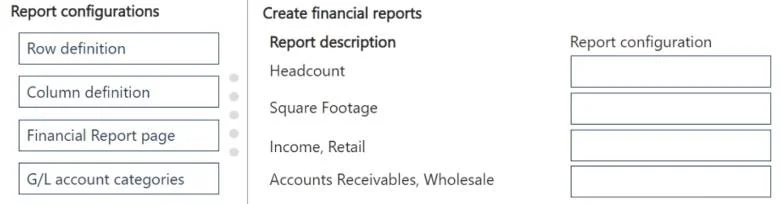
Case Study 4 - Fabrikam, Inc Background Fabrikam, Inc., is a manufacturer of products for the gift industry. The company plans to implement Business Central as its new enterprise resource planning (ERP) system. The company sells to two types of customers: wholesale and retail. Retail customers order at special events and online. Wholesale customers send in orders by email. Current Environment Order processing - The company uses a purchase order (PO) workflow for any PO over $500. - The system has been fully configured for sales order prepayments and will check for a prepayment invoice at posting. - Customers can special order products with a prepayment that is due on receipt. Invoicing - Wholesale customer payment terms are net 30, with a 2% discount if paid within 10 days. - Retail customer payment terms are payable on receipt or shipment. Reporting - The company uses headcount (number of employees) and square footage for statistical accounts. Integrations The company currently uses Outlook, Excel, Word, and Teams to communicate internally and externally with customers and vendors. Requirements Order processing - The company must be able to combine multiple purchase receipts into one vendor invoice. - Posted vendor invoices must be reverted when damages are reported or a product is returned to the vendor. - Fully invoiced POs must not appear on the PO list page. - Customer prepayments vary based on customer relationship. Special orders from new customers have a 25% prepayment. Established customers have only a 15% prepayment. - The company must be able to approve POs by email without opening Business Central. - Customers often reorder the same items with similar quantities. The system must be configured to ask the user if recurring lines should be added to sales orders. Invoicing - Customer revenue must be posted to separate general ledger (G/L) accounts based on customer type. The G/L account must have subcategories for wholesale and retail revenue. - Accounts receivable must be posted to separate G/L accounts based on customer type. The G/L account must have subcategories for wholesale and retail accounts receivable. - Currently, inventory is sold at a cost based on purchase and sales over a period. Reporting - Financial reports must include statistical accounts. - The financial report structure must map to account categories. Integrations The company requires the following integration capabilities: - Create sales orders while collaborating with customers by email. - Edit customer information while messaging the sales team in a group chat. - Communicate a brochure to all customers at once about a sales campaign. General ledger posting accounts The company requires the following G/L posting accounts: - Retail Receivables = 13100 - Wholesale Receivables = 13200 - Payment Discount = 54800 - Retail Sales = 44100 - Wholesale Sales = 44200 - Sales Prepayments = 22160 Issues - Order entry takes too long for wholesale customers. - Vendors ship partial orders but send one monthly invoice. The company is unable to associate one invoice with multiple POs in the current environment. - Inventory reconciliation was difficult in the company's old system because it allowed users to sell more inventory than was physically available. - Users must log in to the system to provide workflow approvals. Drag and Drop Question You need to create financial reports per company reporting requirements. Which report configuration should you use to add the report descriptions to financial reports? To answer, move the appropriate report configurations to the correct report descriptions. You may use each report configuration once, more than once, or not at all. You may need to move the split bar between panes or scroll to view content. NOTE: Each correct selection is worth one point. Answer:
Exhibit
Answer Area
Drag items
Row definitionColumn definitionFinancial Report pageG/L account categories
Unlock MB-800 to see the answer
You've previewed enough free MB-800 questions. Unlock MB-800 for full answers, explanations, the timed quiz mode, progress tracking, and the master PDF. Question stem and options stay visible so you can still see what's on the exam.
Topics
#financial reports#report configuration#account categories#statistical accounts