
MB-800 · Question #235
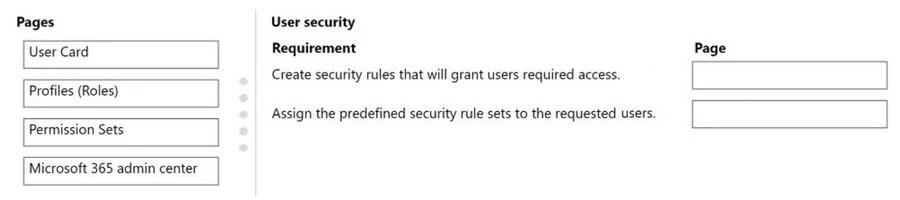
Drag and Drop Question A company uses Dynamics 365 Business Central. The finance manager requires a specific group of operating team users to have access only to a particular set of customer data…
The correct answer is Permission Sets; User Card. Dynamics 365 Business Central - Security Configuration Explained The Two Requirements Being Solved The scenario has two distinct tasks: 1. Define what customer data can be accessed 2. Assign that access to the specific users --- Correct Arrangement 1. Permission Sets → Define…
Question
Exhibit
Answer Area
Drag items
Correct arrangement
- Permission Sets
- User Card
Explanation
Dynamics 365 Business Central - Security Configuration Explained
The Two Requirements Being Solved
The scenario has two distinct tasks:
- Define what customer data can be accessed
- Assign that access to the specific users
Correct Arrangement
1. Permission Sets → Define the customer data access
Why: Permission Sets are where you configure granular access rights in Business Central - which tables, pages, and records (including specific customer data) users can read, write, or execute. You create or modify a Permission Set to include only the customer data the operating team needs. This is the foundation of Business Central's data-level security model.
2. User Card → Assign the permissions to users
Why: The User Card is where you assign Permission Sets to individual users. After defining the correct Permission Set, you open each user's User Card and add that Permission Set to their profile. This enforces the restriction - only those users with the assigned set get access.
Why the Other Options Are Wrong
| Page | Why it's NOT used here |
|---|---|
| Profiles (Roles) | Controls the UI/Role Center layout (which pages appear in navigation), not data-level security. A common misconception - Roles control appearance, not access rights. |
| Microsoft 365 admin center | Used for licensing and user creation, not for configuring in-app data permissions within Business Central. |
Common Misconceptions
- Profiles vs. Permissions: The biggest pitfall. Many candidates assume "Roles" control security - they don't. Roles control the UI experience; Permission Sets control data access.
- Skipping User Card: Defining a Permission Set alone does nothing until it's assigned to users via the User Card (or User Groups for bulk assignment).
- Microsoft 365 admin center scope: It operates at the tenant/license level, not at the Business Central application security level.
Topics
Community Discussion
No community discussion yet for this question.