
MB-500 · Question #89
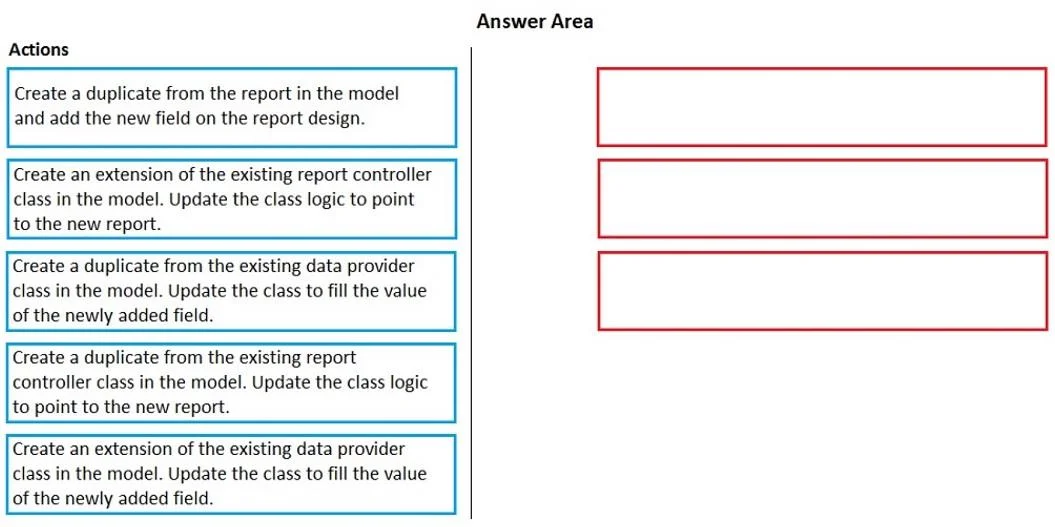
Drag and Drop Question You are a Dynamics 365 Finance developer. You have a report in an existing model that connects with the following objects: - in-memory table - data provider class - controller…
The correct answer is Create an extension of the existing data provider class in the model. Update the class in the model. Update the class to fill the value of the newly added field.; Create a duplicate from the report in the model and add the new field on the report design.; Create an extension of the existing report controller class in the model. Update the class logic to point to the new report. D365 Finance: Extending a Locked Report - Explanation Core Concept First In D365 Finance, the extension model distinguishes between what can be extended vs. what must be duplicated: X++ classes (data provider, controller) → support class extensions ([ExtensionOf(...)]) SSRS…
Question
Exhibit
Answer Area
Drag items
Correct arrangement
- Create an extension of the existing data provider class in the model. Update the class in the model. Update the class to fill the value of the newly added field.
- Create a duplicate from the report in the model and add the new field on the report design.
- Create an extension of the existing report controller class in the model. Update the class logic to point to the new report.
Explanation
D365 Finance: Extending a Locked Report - Explanation
Core Concept First
In D365 Finance, the extension model distinguishes between what can be extended vs. what must be duplicated:
- X++ classes (data provider, controller) → support class extensions (
[ExtensionOf(...)]) - SSRS report designs → cannot be extended; they must be duplicated to modify the layout
The report is locked, meaning you cannot touch the original artifacts directly. The goal is to surface a new field (already added to the in-memory table extension) on the report output.
Step-by-Step Breakdown
Step 1 - Extend the data provider class; fill the new field value
Why first? The data provider (RDP class) is responsible for populating the in-memory table that feeds the report. You've already added a new field to the table extension - but nothing writes data to it yet. Before the report can display the field, the data must exist. Extending the DP class (using [ExtensionOf(classStr(...))]) lets you intercept or override the processReport method to populate your new field without replacing the original class.
Why extension and not duplicate? A duplicate creates a standalone copy - it diverges from future fixes to the original and is harder to maintain. An extension chains onto the original logic, which is the ISV-compliant approach for classes.
Step 2 - Duplicate the report; add the new field to the report design
Why second? Only after data exists for the new field does it make sense to surface it in the design. The report design (SSRS .rdl) cannot be extended - there is no X++ augmentation mechanism for SSRS layout files. Therefore, duplication is the correct and only option here. You create a copy of the report in your model and add the new field to the design. The data to bind to already exists (from Step 1).
Why not extend here? SSRS reports have no extension framework. This is the one place in this workflow where "duplicate" is the right answer, which is why it stands out.
Step 3 - Extend the controller class; point it to the new report
Why last? The controller class orchestrates report execution - it specifies which report name to run. Now that a new report design exists (Step 2), you extend the controller to override the method that returns the report name (typically getReportName() or parmReportName()), redirecting execution to your duplicated report. This step only makes sense after the new report exists.
Why extension and not duplicate? Same reason as Step 1 - classes support extensions. Duplicating the controller creates an orphaned class that no longer benefits from base class changes and requires manual wiring to invoke it.
Common Mistakes / Misconceptions
| Mistake | Why It's Wrong |
|---|---|
| Duplicating the data provider class | Classes should be extended, not duplicated. Duplication breaks the extension model and creates maintenance debt. |
| Duplicating the controller class | Same issue - always extend X++ classes when possible. |
| Extending the report design | Not possible in D365 Finance. SSRS reports must be duplicated to modify layout. |
| Doing Step 3 before Step 2 | The controller can't point to a report that doesn't exist yet. |
| Doing Step 2 before Step 1 | You can add the field column to the design, but it has no data to bind to until the DP is updated. |
Summary Pattern
Extend classes → Duplicate the report design → Extend the controller to wire them together.
This is the canonical "report extension" pattern in D365 Finance when the original report is locked.
Topics
Community Discussion
No community discussion yet for this question.