
MB-500 · Question #91
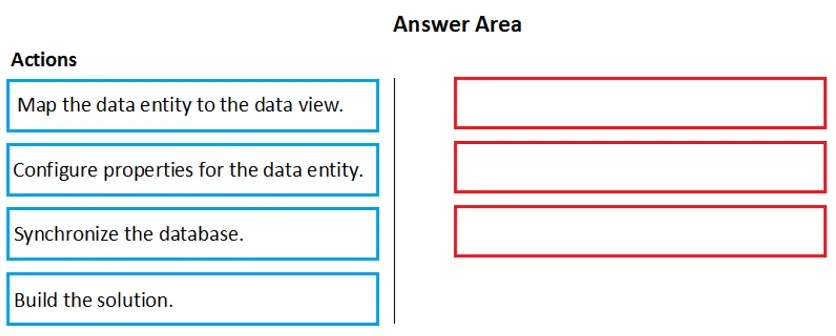
Drag and Drop Question A company uses Dynamics 365 Finance. Client companies require weekly updates for services performed. You create data entity by using the Data Entity wizard. You need to expose…
The correct answer is Configure properties for the data entity.; Build the solution.; Synchronize the database. Dynamics 365 Finance - Data Entity Exposure Workflow Context After using the Data Entity Wizard to create a data entity, the wizard generates the entity but leaves it in an incomplete, unconfigured state. Before external systems can consume it, you must finalize configuration…
Question
Exhibit
Answer Area
Drag items
Correct arrangement
- Configure properties for the data entity.
- Build the solution.
- Synchronize the database.
Explanation
Dynamics 365 Finance - Data Entity Exposure Workflow
Context
After using the Data Entity Wizard to create a data entity, the wizard generates the entity but leaves it in an incomplete, unconfigured state. Before external systems can consume it, you must finalize configuration, compile the code, and align the database schema.
Why This Order?
Step 1: Configure properties for the data entity
The wizard creates a skeleton - you must manually set properties like the entity name, label, public name (used in OData/API exposure), access level, and which fields are visible/required. This must come first because the subsequent build compiles whatever configuration exists at that moment. Configuring after building means your build reflects stale or default settings and you'd need to rebuild anyway.
Common mistake: Assuming the wizard fully configures the entity for you. It does not - it scaffolds it.
Step 2: Build the solution
Building compiles the X++ code, validates the entity's metadata, and registers it within the AOT (Application Object Tree). External exposure (OData endpoints, DIXF, etc.) is based on compiled artifacts. You cannot synchronize a database against code that hasn't been compiled - the sync reads from compiled metadata to determine what schema changes are needed.
Common mistake: Trying to synchronize before building. This fails or produces incomplete results because the compiled definition doesn't yet reflect your configuration changes.
Step 3: Synchronize the database
Database sync pushes the compiled entity's schema changes to the SQL database - creating or updating backing views and tables. Only after sync is the entity truly "live" and accessible to external consumers (e.g., via OData for integration).
Common mistake: Thinking the build alone is sufficient. Build compiles code; sync is what makes it queryable against real data.
Why "Map the data entity to the data view" is excluded
This is a distractor. The Data Entity Wizard automatically handles the view mapping as part of the entity creation process. Manually mapping it afterward is not a required post-wizard step, making it incorrect for this scenario.
Summary Table
| Step | Action | Why |
|---|---|---|
| 1 | Configure properties | Defines what gets compiled - must precede build |
| 2 | Build the solution | Compiles config into deployable artifacts - must precede sync |
| 3 | Synchronize the database | Applies compiled schema to DB, enabling live access |
Topics
Community Discussion
No community discussion yet for this question.