
MB-500 · Question #86
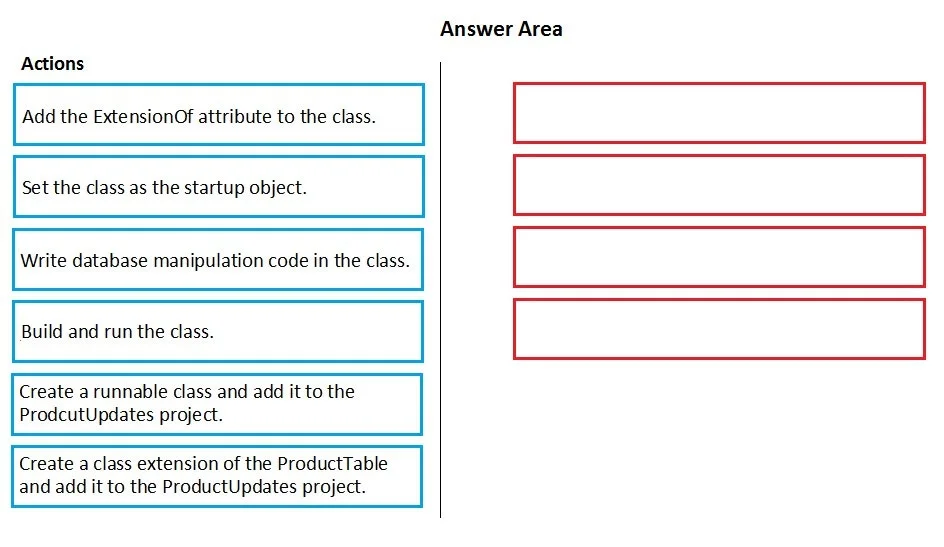
Drag and Drop Question You create a Visual Studio project named ProductUpdates. You must update data in a table named ProductTable. You must be able to run the code from Visual Studio. You need to…
The correct answer is Create a runnable class and add it to the ProductUpdates project.; Write database manipulation code in the class.; Set the class as the startup object.; Build and run the class. X++ Runnable Class - Exam Question Breakdown Context: Microsoft Dynamics 365 Finance & Operations (D365 F&O). You need to execute X++ code from Visual Studio to manipulate a database table. --- Why This Sequence? Step 1 - Create a runnable class and add it to the ProductUpdates…
Question
Exhibit
Answer Area
Drag items
Correct arrangement
- Create a runnable class and add it to the ProductUpdates project.
- Write database manipulation code in the class.
- Set the class as the startup object.
- Build and run the class.
Explanation
X++ Runnable Class - Exam Question Breakdown
Context: Microsoft Dynamics 365 Finance & Operations (D365 F&O). You need to execute X++ code from Visual Studio to manipulate a database table.
Why This Sequence?
Step 1 - Create a runnable class and add it to the ProductUpdates project
A runnable class in X++ is one that implements a main() method (the entry point). Without this, there is nothing to execute. You must create this class and add it to the project first because every subsequent step depends on it existing.
A regular class with no
main()method cannot be set as a startup object or run directly.
Step 2 - Write database manipulation code in the class
Once the class shell exists, you write the actual logic - SELECT, INSERT, UPDATE, or DELETE operations against ProductTable using X++ DML (e.g., ttsbegin/ttscommit blocks, update_recordset, etc.).
You write code before configuring run settings because the startup object setting is a project property, not a code dependency - but you need code to exist before you validate/run anything.
Step 3 - Set the class as the startup object
In Visual Studio, you right-click the project → Properties → set the Startup Object to your runnable class. This tells the runtime which class to invoke when you press Run.
This comes after writing code (you need to know which class to point to) but before building/running (the runtime needs this pointer configured first).
Step 4 - Build and run the class
With code written and the startup object configured, you build the project (compiles X++ to CIL) and run it. D365 F&O executes the main() method against the connected AOS.
Why the Two Distractors Are Wrong
| Rejected Item | Why It Doesn't Belong |
|---|---|
Add the ExtensionOf attribute to the class | This creates a class extension - used to augment existing classes without modifying them. The task requires a new standalone runnable class, not an extension. |
| Create a class extension of ProductTable and add it to the project | This would extend the table class, which is for adding methods/fields to the table itself - not for running standalone database manipulation code from Visual Studio. |
Common Mistakes
- Confusing runnable classes with class extensions -
ExtensionOfis for augmentation patterns (non-destructive customization), not for entry-point execution. - Setting the startup object before writing code - Technically possible in any order, but logically you confirm which class to set only after the class has its purpose defined.
- Forgetting
main()makes a class "runnable" - A class withoutmain()will not appear as a valid startup object option.
Topics
Community Discussion
No community discussion yet for this question.