
MB-500 · Question #176
Drag and Drop Question You are developing new features for an app. You must perform unit testing for the features by using the Unit Test framework. You need to create unit test code using…
The correct answer is SysTestMethodAttribute; SysTestInactivateTestAttribute. D365 F&O / X++ SysTest Framework - Unit Test Attributes This question is from the Microsoft Dynamics 365 Finance and Operations (X++) Unit Test (SysTest) framework. --- The Four Available Attributes | Attribute | Purpose | |---|---| | SysTestMethodAttribute | Marks a method as…
Question
Exhibit
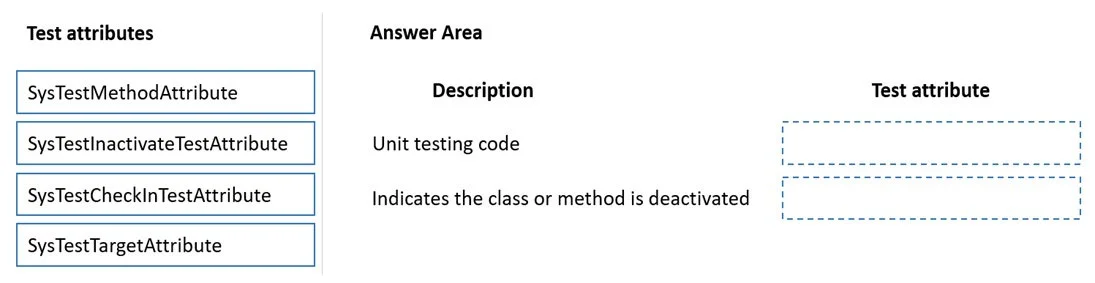
Answer Area
Drag items
Correct arrangement
- SysTestMethodAttribute
- SysTestInactivateTestAttribute
Explanation
D365 F&O / X++ SysTest Framework - Unit Test Attributes
This question is from the Microsoft Dynamics 365 Finance and Operations (X++) Unit Test (SysTest) framework.
The Four Available Attributes
| Attribute | Purpose |
|---|---|
SysTestMethodAttribute | Marks a method as an executable unit test |
SysTestInactivateTestAttribute | Disables a test so it is skipped during test runs |
SysTestCheckInTestAttribute | Flags a test to run during check-in/CI validation |
SysTestTargetAttribute | Documents which class/method the test is covering |
Why the Correct Arrangement is What It Is
Position 1 → SysTestMethodAttribute
This is the foundational test attribute. Without it, the test runner does not recognize the method as a test at all - it's just an ordinary method. It is the X++ equivalent of [TestMethod] in MSTest. Any method intended to run as a unit test must carry this attribute.
Likely description it maps to: "Identifies a method as a unit test method that the test runner should execute."
Position 2 → SysTestInactivateTestAttribute
This attribute disables a test without deleting it. When applied alongside SysTestMethodAttribute, the test runner will skip the method. This is used when a test is known to be broken, flaky, or temporarily irrelevant, and you want to preserve the code without letting it block test runs.
Likely description it maps to: "Prevents a test method from running without removing it from the codebase."
Why the Other Two Were Not Selected
SysTestCheckInTestAttribute- Marks tests for check-in validation pipelines. Not a general "create a test method" or "disable a test" attribute, so it doesn't fit the described scenarios.SysTestTargetAttribute- Purely metadata/documentation; it links the test to its target class or method but has no effect on execution behavior.
Common Misconceptions
- Confusing
SysTestCheckInTestAttributewithSysTestMethodAttribute- Check-in tests still needSysTestMethodAttributeto actually run;SysTestCheckInTestAttributeonly categorizes them. - Thinking
SysTestInactivateTestAttributedeletes or comments out the test - It doesn't. The code stays; the runner just skips it. - Omitting
SysTestMethodAttributeentirely - A method decorated only withSysTestTargetAttributeorSysTestCheckInTestAttributewill not execute as a test.
Topics
Community Discussion
No community discussion yet for this question.