
MB-500 · Question #197
Drag and Drop Question A company uses Dynamics 365 Finance. You implement the unit rest framework. You must automate the testing for previously developed functionality. You need to create unit tests…
The correct answer is Open Visual Studio as an administrator.; Add a new class to the project.; Extend the SysTestCase class in the class declaration.; Add methods to the class and decorate the methods with the [SysTestMethod] attribute.; Create a new test method. Dynamics 365 Finance - Unit Test Framework: Explanation Why This Order? The sequence follows the mandatory setup-before-use principle of X++ development in Visual Studio and the SysTestCase framework. --- Step-by-Step Breakdown 1. Open Visual Studio as an administrator Dynamics…
Question
Exhibit
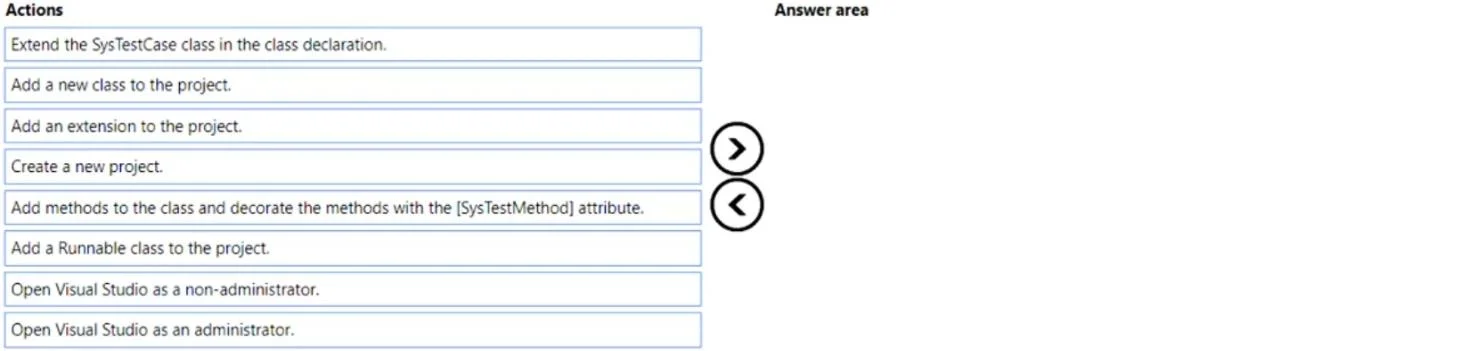
Answer Area
Drag items
Correct arrangement
- Open Visual Studio as an administrator.
- Add a new class to the project.
- Extend the SysTestCase class in the class declaration.
- Add methods to the class and decorate the methods with the [SysTestMethod] attribute.
- Create a new test method.
Explanation
Dynamics 365 Finance - Unit Test Framework: Explanation
Why This Order?
The sequence follows the mandatory setup-before-use principle of X++ development in Visual Studio and the SysTestCase framework.
Step-by-Step Breakdown
1. Open Visual Studio as an administrator Dynamics 365 Finance development requires admin privileges to interact with the AOT (Application Object Tree), compile X++ code, and synchronize with the database. Without elevated permissions, you cannot deploy or run tests against the D365 environment. This is always the first step.
Common mistake: Choosing "non-administrator" - Visual Studio will open but critical D365 operations will silently fail or be blocked.
2. Add a new class to the project Before any test logic can exist, you need a container - a new X++ class in your model/project. You cannot extend or decorate something that doesn't exist yet.
Common mistake: Choosing "Add an extension" or "Add a Runnable class." Extensions modify existing objects; Runnable classes are for standalone executable code - neither is the right construct for a test class.
3. Extend the SysTestCase class in the class declaration
Once the class exists, you declare it as a test class by extending SysTestCase. This is the base class of the entire D365 unit test framework. Without this inheritance, the test runner has no way to discover or execute the class as a test suite.
class MyTestClass extends SysTestCase
{
}
This must come before adding methods, because the methods need the inherited framework infrastructure (e.g., assert* methods, setup/teardown lifecycle).
4. Add methods to the class and decorate the methods with the [SysTestMethod] attribute
With the class properly inheriting from SysTestCase, you add methods and mark them with [SysTestMethod]. This attribute is how the test runner identifies which methods to execute - without it, a method is just a regular method.
[SysTestMethod]
public void testMyFeature()
{
}
5. Create a new test method This is the implementation step - writing the actual test logic inside the decorated method (assertions, data setup, calling the unit under test). It is last because you cannot write meaningful test logic until the class structure and method scaffolding are in place.
Quick Reference - Eliminated Distractors
| Item | Why Excluded |
|---|---|
| Add an extension to the project | Used for extending existing objects, not creating new test classes |
| Add a Runnable class to the project | Runnable classes are for executable scripts, not unit tests |
| Open Visual Studio as a non-administrator | D365 Finance development requires admin privileges |
Key Takeaway
The sequence mirrors a strict dependency chain: environment → container → classification → decoration → implementation. Each step is a prerequisite for the next, and skipping or reordering any one of them breaks the ability of the test framework to discover and run your tests.
Topics
Community Discussion
No community discussion yet for this question.