
MB-500 · Question #208
Drag and Drop Question A company plans to implement Dynamics 365 Finance. The company is unsure whether to use a cloud implementation or an on-premises implementation. You need to determine the…
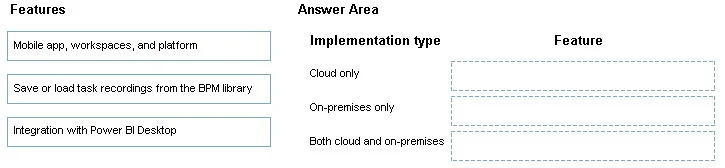
The correct answer is Mobile app, workspaces, and platform; Save or load task recordings from the BPM library; Integration with Power BI Desktop. Dynamics 365 Finance: Cloud vs. On-Premises Features This question tests your knowledge of which Dynamics 365 Finance features are available depending on deployment type. The core distinction: cloud (online) deployments have access to all platform features, while on-premises…
Question
Exhibit
Answer Area
Drag items
Correct arrangement
- Mobile app, workspaces, and platform
- Save or load task recordings from the BPM library
- Integration with Power BI Desktop
Explanation
Dynamics 365 Finance: Cloud vs. On-Premises Features
This question tests your knowledge of which Dynamics 365 Finance features are available depending on deployment type. The core distinction: cloud (online) deployments have access to all platform features, while on-premises deployments have restricted access due to limited or no Lifecycle Services (LCS) / Microsoft cloud connectivity.
Item 1 - Mobile App, Workspaces, and Platform
Applies to: Both Cloud and On-Premises
The core mobile workspaces and platform framework are supported in both deployment types. Microsoft made this available on-premises to allow field workers and mobile users basic functionality. However, cloud deployments get more workspace options and updates faster.
Common misconception: People assume mobile = cloud only. The mobile platform itself ships with the product regardless of deployment.
Item 2 - Save or Load Task Recordings from the BPM Library
Applies to: Cloud Only
The BPM (Business Process Modeler) library lives in Lifecycle Services (LCS), which is a Microsoft-hosted cloud service. To save/load task recordings from BPM, the environment must have LCS connectivity. On-premises deployments have very limited LCS integration and cannot sync task recordings to/from the BPM library.
Common misconception: Task Recorder itself works on-premises - but saving to/loading from the BPM library requires the cloud LCS connection. This is the critical distinction exams test.
Item 3 - Integration with Power BI Desktop
Applies to: Both Cloud and On-Premises
Power BI Desktop connects directly to the local AOS (Application Object Server) using an OData feed or direct query, which works regardless of whether the environment is cloud-hosted or on-premises. This is distinct from embedded Power BI dashboards (Power BI.com service), which are cloud-only.
Common misconception: Confusing Power BI Desktop (local tool, works both) with the embedded Power BI service (cloud-only). Exams exploit this distinction frequently.
Summary Table
| Feature | Cloud | On-Premises |
|---|---|---|
| Mobile app, workspaces, and platform | Yes | Yes |
| Save/load task recordings from BPM library | Yes | No |
| Integration with Power BI Desktop | Yes | Yes |
The BPM library feature is the key differentiator - it is the only item exclusive to cloud deployments because it depends on LCS cloud infrastructure.
Topics
Community Discussion
No community discussion yet for this question.