
MB-500 · Question #209
Drag and Drop Question You are a Dynamics 365 Finance developer. A long running process times out in the system. You need to implement the asynchronous framework to resolve this issue. Which class…
The correct answer is Global; FormRun; Global. Dynamics 365 Finance: Asynchronous Framework - runAsync Class Selection Background In D365 Finance (X++), the asynchronous framework lets you offload long-running processes to avoid session timeouts. Two key classes expose a runAsync method: Global and FormRun. Choosing between…
Question
Exhibit
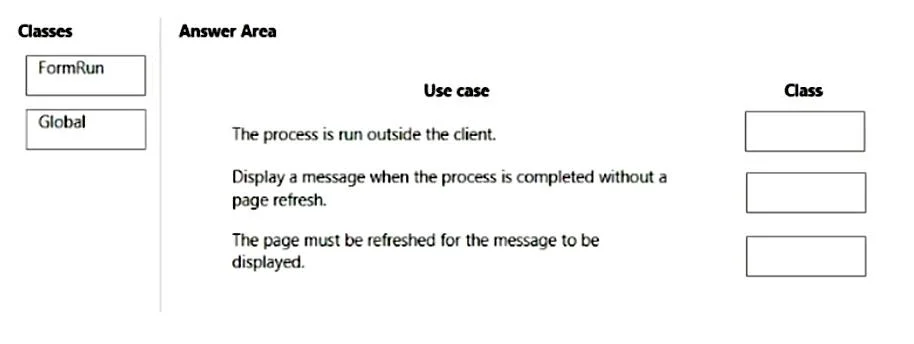
Answer Area
Drag items
Correct arrangement
- Global
- FormRun
- Global
Explanation
Dynamics 365 Finance: Asynchronous Framework - runAsync Class Selection
Background
In D365 Finance (X++), the asynchronous framework lets you offload long-running processes to avoid session timeouts. Two key classes expose a runAsync method: Global and FormRun. Choosing between them depends on whether the operation requires a form/UI context.
The Two Classes Explained
| Class | Context | When to Use |
|---|---|---|
Global | No form/UI session required | Server-side operations, non-UI async calls |
FormRun | Requires an active form session | Operations that interact with or update form controls/UI |
Arrangement Breakdown
Placement 1 → Global
Used when the async operation runs independently of any form. Global::runAsync spawns a new server-side session with no UI dependency. Typical use: triggering a background calculation or data process from a non-form context (e.g., service class, batch trigger).
Placement 2 → FormRun
Used when the async operation needs access to the calling form's context - for example, reading form datasource records or updating form controls after completion. FormRun::runAsync preserves the form session so UI interaction remains valid.
Placement 3 → Global
Again server-side, no form context. This reinforces that Global::runAsync is the general-purpose async launcher when the operation is purely business logic with no UI involvement.
Common Mistakes
- Using
FormRunfor server-only tasks: Unnecessary overhead; form context isn't available in all execution environments. - Using
Globalwhen UI updates are needed: The async callback won't have access to form controls, causing runtime errors or silent failures. - Assuming
Globalmeans "global scope": In this context it refers to theGlobalkernel class and its staticrunAsyncmethod, not a variable scope concept.
Key Rule of Thumb
If the async operation touches the UI or form data, use
FormRun::runAsync.
For everything else (pure logic, server-side), useGlobal::runAsync.
Topics
Community Discussion
No community discussion yet for this question.