
MB-500 · Question #202
Drag and Drop Question A company is implementing Dynamics 365 Finance. You are extending the standard fixed asset functionality to develop a new feature. You need to select the appropriate…
The correct answer is Package; Project. Dynamics 365 F&O Development Components Explained The D365 Development Hierarchy Understanding the relationship between these three components is essential: `` Package └── Model(s) └── Project(s) (Visual Studio) `` --- Why Each Item Is Placed Where It Is Slot 1 → Package A…
Question
Exhibit
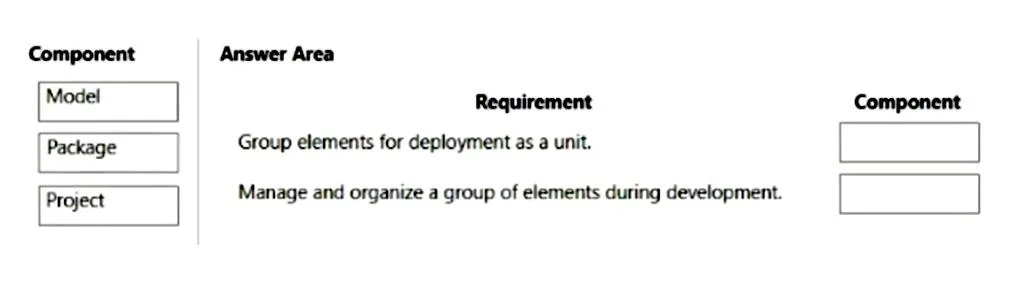
Answer Area
Drag items
Correct arrangement
- Package
- Project
Explanation
Dynamics 365 F&O Development Components Explained
The D365 Development Hierarchy
Understanding the relationship between these three components is essential:
Package
  └── Model(s)
        └── Project(s) (Visual Studio)
Why Each Item Is Placed Where It Is
Slot 1 → Package
A Package is the top-level deployable unit in D365 F&O. It:
- Is what actually gets deployed to an environment (as a Deployable Package)
- Contains one or more Models
- Represents the distributable artifact of your solution
When extending fixed assets, you create an extension package that holds your customizations. This is the unit you ship and deploy - it answers the requirement of "what do you deploy?"
Slot 2 → Project
A Project is the Visual Studio container where development work is organized. It:
- Maps to elements within a Model
- Is where developers write code, create extensions, and build artifacts
- Is the working environment for the developer
This answers the requirement of "where do you do the actual development work?"
Why Model Is NOT Selected
This is the most common misconception. A Model logically sits between Package and Project, but for these specific requirements, it isn't the right answer because:
- The question focuses on deployment (→ Package) and development workspace (→ Project)
- Model is an organizational/distributable grouping concept, not directly the "deploy" or "develop" artifact in this context
- In extension scenarios, the existing model (e.g., ApplicationSuite) may already be referenced, rather than a new one being created
Common Mistakes
| Mistake | Why It's Wrong |
|---|---|
| Choosing Model over Package | Model is inside a Package; you deploy a Package, not a Model directly |
| Choosing Model over Project | You write code in a Project, not directly in a Model |
| Thinking these are interchangeable | They serve distinct purposes in a strict hierarchy |
Key rule: Package = deploy it, Project = build it, Model = organizes elements within a Package.
Topics
Community Discussion
No community discussion yet for this question.