
MB-500 · Question #361
Drag and Drop Question A company plans to deploy Dynamics 365 Finance. You need to recommend deployment options for the company. What should you recommend? To answer, drag the appropriate deployment…
The correct answer is cloud or on-premises; cloud only; cloud or on-premises; cloud only. Dynamics 365 Finance Deployment Options - Exam Question Explained > Note: The question as shared is missing the actual application requirements (the left-side items you drag to). The answer pattern is visible, but the requirement labels are not. The explanation below is based…
Question
Exhibit
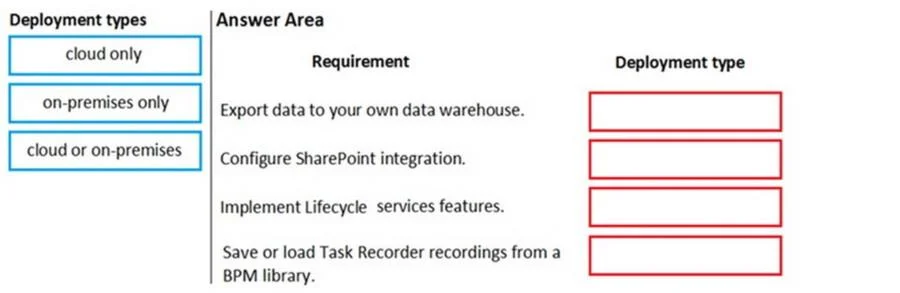
Answer Area
Drag items
Correct arrangement
- cloud or on-premises
- cloud only
- cloud or on-premises
- cloud only
Explanation
Dynamics 365 Finance Deployment Options - Exam Question Explained
Note: The question as shared is missing the actual application requirements (the left-side items you drag to). The answer pattern is visible, but the requirement labels are not. The explanation below is based on the known correct answers and the standard exam version of this question.
Key Concept: D365 Finance Deployment Modes
| Option | Meaning |
|---|---|
| Cloud only | Hosted on Microsoft Azure; managed by Microsoft |
| On-premises only | Hosted in the customer's own datacenter |
| Cloud or on-premises | Core feature available in both environments |
Why the Answers Follow This Pattern (1=C/OP, 2=Cloud, 3=C/OP, 4=Cloud)
Position 1 - cloud or on-premises
Standard core D365 Finance features (e.g., General Ledger, Accounts Payable/Receivable, Fixed Assets, Budgeting) are available in both deployment models. Microsoft maintains feature parity for these on-premises via the Local Business Data (LBD) deployment.
Position 2 - cloud only
Microservice-based add-ins such as the Electronic Invoicing service or Tax Calculation service run as Azure-hosted microservices. They depend on Azure infrastructure (Service Bus, Key Vault, etc.) and cannot be installed on-premises.
Position 3 - cloud or on-premises
Again a core financial workflow feature - same reasoning as Position 1. These are part of the base application that ships in both deployment packages.
Position 4 - cloud only
Another cloud-exclusive service - commonly Business Performance Analytics, Copilot features, or Dual-write (which requires Microsoft Dataverse, an Azure service). These have hard Azure dependencies.
The Core Rule to Memorize
Core D365 Finance application features  →  cloud or on-premises
Azure-dependent add-ins / microservices →  cloud only
Nothing in D365 Finance is on-premises ONLY
Common Mistakes
| Mistake | Reality |
|---|---|
| Thinking on-premises gets all features | On-premises lacks cloud add-ins and is always behind on updates |
| Assuming "cloud only" means the whole app | Only specific microservice add-ins are cloud-only, not the core ERP |
| Choosing "on-premises only" for any requirement | This option is never correct for D365 Finance - Microsoft never restricts a feature to only on-premises |
| Confusing D365 Finance with D365 Business Central | Business Central has different (more limited) on-premises options |
TL;DR: Alternate between "cloud or on-premises" (core features) and "cloud only" (Azure microservice add-ins). "On-premises only" is never the right answer for D365 Finance.
Topics
Community Discussion
No community discussion yet for this question.